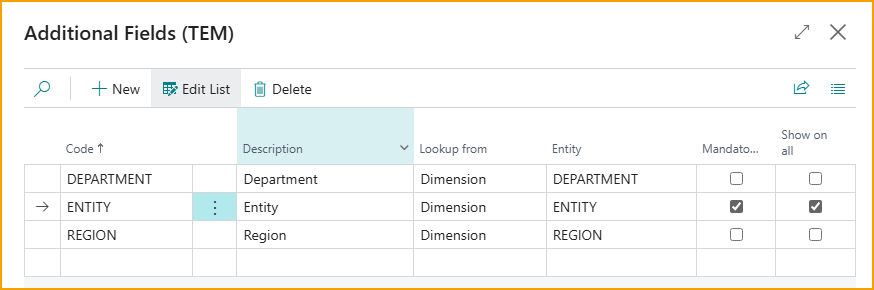
Zusatzfelder-Einrichtung
Die Zusatzfelder-Einrichtung ermöglicht es Ihnen, zusätzliche Felder auf der Ausgabeneingabeseite zu definieren, damit Benutzer bestimmte Werte eingeben können. Derzeit unterstützt die Seite das Hinzufügen von Dimensionsfeldern.
Zusatzfelder erstellen/verwalten
- Wählen Sie auf der Seite Reise- und Speseneinrichtung – Übersicht die Option Zusatzfelder aus
- Wählen Sie Neu, um ein Zusatzfeld zu erstellen.
- Um ein vorhandenes Zusatzfeld zu verwalten, wählen Sie das Zusatzfeld aus und wählen Sie Liste bearbeiten aus dem Menü Verwalten.
- Geben Sie Werte für die folgenden Felder ein:
- Code: Geben Sie eine kurze, aussagekräftige Kennung für das Zusatzfeld ein.
- Beschreibung: Geben Sie eine Beschreibung ein
- Lookup von: Wählen Sie die Lookup-Werte aus, die Sie für dieses Feld anzeigen möchten (Dimension).
- Entität: Wählen Sie die Dimension aus, die Sie auf der Ausgabeneingabeseite anzeigen möchten.
- Obligatorisch: Aktivieren Sie das Kontrollkästchen, falls es für Benutzer obligatorisch sein soll, beim Einreichen von Ausgaben einen Dimensionswert für diese Dimension auszuwählen.
- Auf allen anzeigen: Wenn aktiviert, ist das Zusatzfeld automatisch für alle Ausgabentypen und Kategorien verfügbar. Dies verringert den Bedarf, die Feldsichtbarkeit einzeln zu konfigurieren, und gewährleistet eine konsistente Datenerfassung über alle Ausgaben hinweg.
- Um die Zusatzfelder zu aktivieren, müssen sie Ausgabenkategorie(n) zugewiesen werden.