LOCALIZACIÓN Y CARACTERÍSTICAS REGIONALES
Esta sección destaca cómo Travel & Expense se adapta a diferentes países y regiones. Cubre características como el manejo de impuestos, reglas de IVA o GST, soporte de deducción de comidas y visibilidad de campos según la ubicación de la empresa, garantizando el cumplimiento y simplificando la gestión de gastos para usuarios globales.
Integración con Nordea First Card
En los países nórdicos, Travel & Expense admite la integración de transacciones en tiempo real con tarjetas de crédito Nordea First Card. Cuando ocurre una transacción, los usuarios reciben una notificación push en la aplicación en segundos, permitiéndoles adjuntar inmediatamente una foto del recibo o responder rápidamente a posibles alertas de fraude.
Cómo funciona
- Se realiza una compra usando una tarjeta de crédito Nordea First Card.
- La transacción se envía a Travel & Expense en tiempo real.
- El usuario recibe una notificación push en la aplicación móvil en segundos.
- El usuario puede adjuntar una foto del recibo inmediatamente o tomar medidas si la transacción parece sospechosa.
Ajustes de campos visibles
Para apoyar el cumplimiento regional, Travel & Expense ajusta dinámicamente qué campos se muestran según la ubicación de la empresa en Business Central. Para empresas en América del Norte, se muestran campos relacionados con impuestos, mientras que las empresas en otras regiones verán campos relacionados con IVA.
Soporte de deducción de IVA de comidas suecas
Cuando la empresa de Business Central está registrada en Suecia y SmartExtract está configurado con grupos de contabilización que siguen las reglas suecas de deducción de comidas—12% de IVA para alimentos, 25% de IVA para alcohol y 0% de IVA para otros artículos—un botón dedicado de deducción de IVA está disponible en la entrada de gastos.
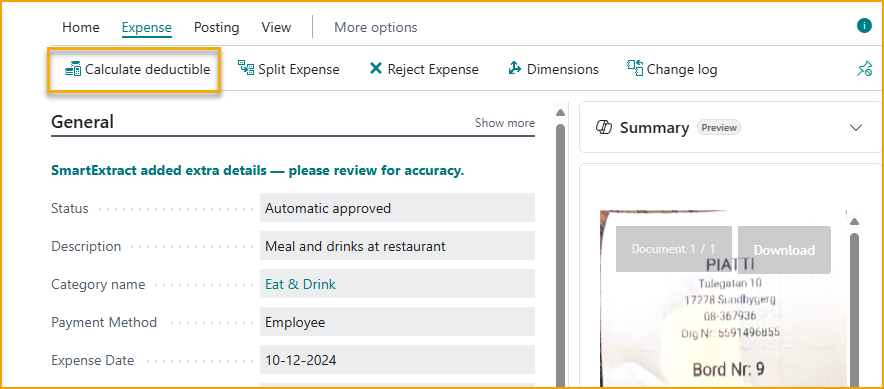
Esta característica permite a los usuarios calcular automáticamente las deducciones de IVA elegibles de acuerdo con las regulaciones de Skatteverket. Una vez que se aplican las líneas calculadas, el gasto se ajusta para reflejar el tratamiento de IVA correcto.
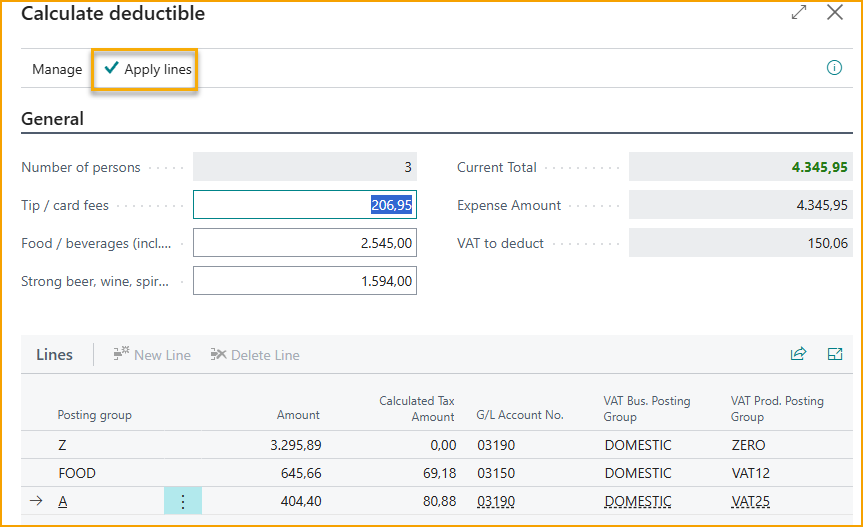
Cómo funciona
- Al ingresar un gasto en la aplicación o portal web, SmartExtract analiza el recibo e identifica los artículos sujetos a las reglas de IVA suecas.
- Si la empresa está registrada en Suecia y los grupos de contabilización están configurados correctamente, el botón Calculate Deductible (Deducción de IVA) se vuelve visible.
- Toque el botón para calcular automáticamente los montos de IVA deducibles según el tipo de gasto:
- Alimentos: 12% de IVA
- Alcohol: 25% de IVA
- Otros artículos: 0% de IVA
- El IVA calculado se aplica al gasto, reduciendo la entrada manual y garantizando el cumplimiento con las regulaciones fiscales suecas.
Nota: El botón Calculate Deductible (Deducción de IVA) solo aparece para empresas configuradas en Suecia con grupos de contabilización SmartExtract configurados según las reglas locales.
Manejo de impuestos canadienses
Cuando la empresa de Business Central está registrada en Canadá, SmartExtract aplica automáticamente el Área fiscal apropiada a cada gasto. No se requiere configuración adicional. El sistema detecta si un gasto es imponible y selecciona el área fiscal correcta de la lista definida en Business Central.
Nota: Esta asignación automática garantiza el cumplimiento con las reglas fiscales canadienses y reduce la necesidad de entrada manual.
Cómo funciona
- Cuando se ingresa un gasto en la aplicación o portal web, SmartExtract analiza el recibo y determina si está sujeto a impuestos.
- Si la empresa está registrada en Canadá, el sistema selecciona automáticamente el área fiscal correcta de la lista definida en Business Central.
- El área fiscal asignada se aplica al gasto, garantizando informes fiscales precisos.
- Los usuarios no necesitan ajustar manualmente la configuración de impuestos, reduciendo errores y ahorrando tiempo.
Nota: Esta característica solo se aplica a empresas registradas en Canadá con Áreas fiscales configuradas correctamente en Business Central.
Reporte a la autoridad fiscal finlandesa (KATRE)
Se ha agregado soporte para informar datos de dietas y kilometraje a la autoridad fiscal finlandesa (KATRE), garantizando el cumplimiento con los requisitos de informes legales locales.