Release Notes
Truvio Expense Management 4.3 – Release Notes
Type of Release
Minor Release
Release Date
April 2026
What's New
We’re pleased to announce the release of Truvio Expense Management version 4.3.
Credit Cards
• Processed credit card transactions are now shown as Settled in history and are no longer included in “Being processed”.
• Improved handling of authorize and clear flows for real-time transaction providers, ensuring more consistent transaction behavior.
• Credit card agreement codes are now visible on the credit card transaction list.
• The change log now shows more detailed information when expenses are submitted without a card transaction and later matched automatically.
Mileage
• Mileage rates now support more decimal places, improving calculation precision.
• Stability improvements ensure employee vehicle defaults are retained.
Expense
• VAT calculations on expense lines now handle VAT calculation type of "Full VAT" correctly.
• The order in which dimensions are applied has been adjusted to improve posting accuracy.
• Posting group information is now shown on the expense list, making it easier for finance teams to identify the applied posting setup before posting.
Expense Reports
• Expense reports with partially posted expenses are handled more reliably.
• If some lines were rejected while others were approved, the report is now automatically approved when the employee resubmits it without the rejected lines.
• Project information set on an expense report no longer overrides project information specified on individual expenses.
Swedish localization
• Per Diem rates can now be updated automatically using data from Skatteverket, making allowance maintenance easier for finance teams.
• Visma Lön exports now include additional configuration options.
Finish localization
• Per Diem calculations based on travel days (24-hour periods) are now applied correctly instead of calendar days, improving accuracy.
• Per Diem adjustments now have an option for accommodation
• Reimbursements via vendor are supported for KATRE reporting in Finland.
• Expenses from a specific posting group can be included in KATRE reporting
ExFlow Travel & Expense 4.2 – Release Notes
Type of Release
Major Release
Release Date
March 2026
What's New
We’re pleased to announce the release of Truvio Expense Management version 4.2.
Key Highlights
• SmartExtract company requirement for guests to support compliant client entertainment
• Improved SmartExtract merchant identification
• Vendor Mapping based on SmartExtract merchant data for vendor spend analysis
• Support for statutory reporting to the Finnish Tax Authority (KATRE)
• Force approval option to enforce approval regardless of other conditions
• Enhanced duplicate expense detection with date offsets and receipt number matching
• Credit card surcharge percentage on card agreements to improve expense matching
• Setup copy between companies with detailed import logging
• Employee source information included on G/L entries from credit card balance postings
SmartExtract
SmartExtract now extracts merchant and receipt number information from expense attachments, supporting features such as vendor mapping and improved duplicate detection.
Additional Fields
Additional Fields now include a “Show on all” option.
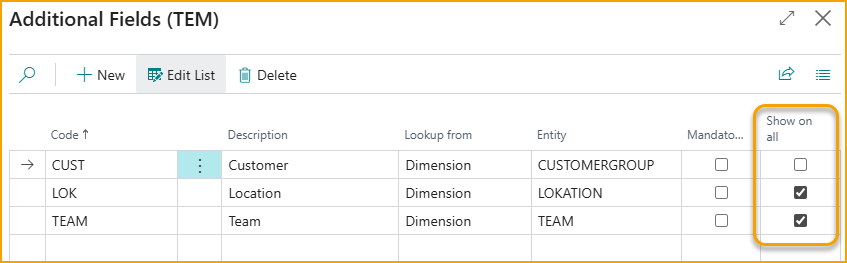
When enabled, the field is automatically available on all expense types and categories. This reduces the need to configure field visibility individually and ensuring consistent data capture across expenses.
Vendor Mapping
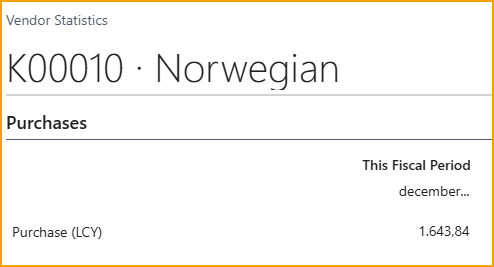
A new Vendor Mapping feature allows the finance team to map merchants identified by SmartExtract on expense attachments to vendors.

This makes it possible to monitor and analyze spend per vendor, even when costs are incurred and settled through employee expense claims. When expenses are posted, the amounts are reflected on the vendor as purchases, enabling vendor statistics and reporting to include expense based spend.
Category configuration
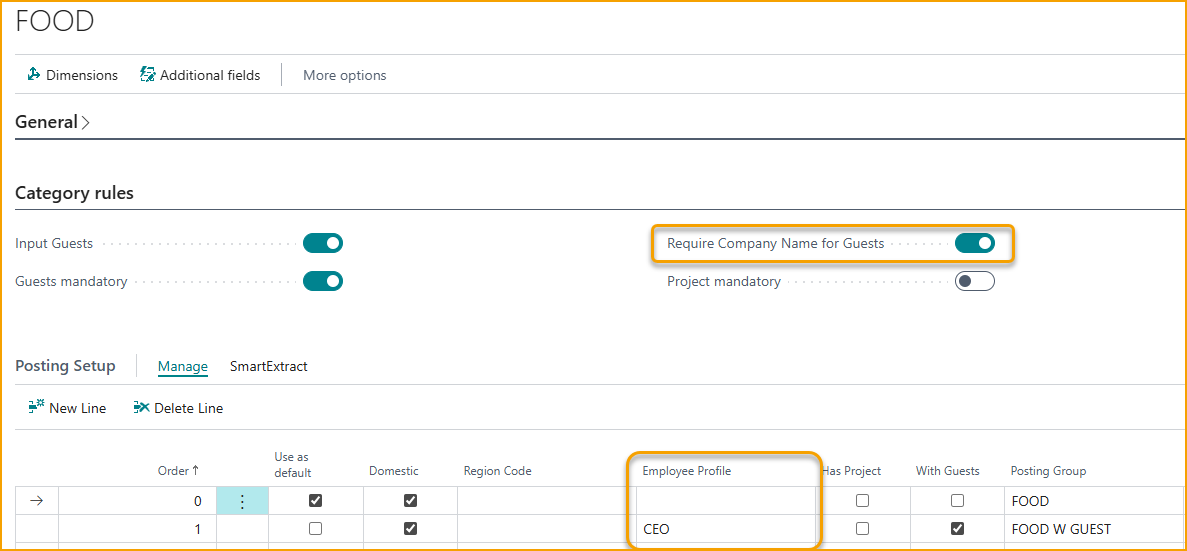
You can now require that guests include a company name when applicable, helping ensure compliance with client entertainment scenarios. This requires the SmartExtract “Extract name/company from Guest” feature to be enabled in Setup.
For Posting Setup, Employee Profile is now included as a parameter in the posting selection logic.
Reporting to Finnish Tax Authority (KATRE)
Support has been added for reporting data for Per Diem and Mileage to the Finnish Tax Authority (KATRE), ensuring compliance with local statutory reporting requirements.
Reimbursement Payroll Export
A “Generic Excel export” option has been added for Reimbursement, making it easier to integrate with external payroll or financial systems that require a flexible file format.
Role Center Improvements
Usability and stability improvements have been made to the Role Center experience.
Issues where Business Central users without TEM permissions experienced Role Center errors have been fixed.
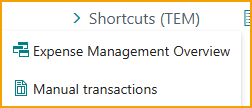
A Shortcut action has been added to extended Role Centers for faster navigation.
Localizations
An issue affecting posting of expenses in the Spanish localization has been fixed, ensuring correct posting behavior in ES environments.
Approval
Approval handling has been enhanced with additional controls and validations.
• A “Force approval” option has been added to Business Central to enforce approval regardless of other conditions.
• Approval warnings for allowed amounts now take the number of employees into consideration.
• Rejected expenses and unsubmitted expense reports are excluded from duplicate checks.
• Duplicate detection enhancements
o Date offset support to detect duplicates across different expense dates
o Receipt number-based matching using merchant information extracted from receipts
Company Cards
Company Card functionality has been extended with multiple improvements.
• Card transactions can now be imported from file with support for separate debit and credit columns. You can also define text that should be stripped from transaction descriptions during import. A pre-check ensures that all cards in the file have an agreement specified, which is especially useful when importing the same transaction file into multiple agreements.
• Expense matching has been improved for transaction feeds that contain only local currency amounts. Card agreements now include an option to specify a credit card surcharge percentage, improving matching accuracy when surcharges are not shown on receipts.
• The overall card flow on Card Agreements has been refined.
• AirPlus credit card setup now includes a downloadable PDF form for submission to AirPlus (Nordic).
Copy setup between companies
A new feature has been introduced that allows setup and configuration to be copied from one company to another. If errors occur during the import, a detailed import log is displayed to support validation and troubleshooting.
Usability improvements
Tooltips have also been added across the solution to support easier onboarding.
Employee source information is now included on G/L entries created from credit card balance postings.
Bug Fixes
The upgrade process now resolves expenses that were previously stuck in AI Processing.
Automatic approval of Expense Reports that have already been part of an approval flow have been fixed.
ExFlow Travel & Expense 4.1 – Release Notes
Type of Release
Major Release
Release Date
February 2026
What's New
We’re pleased to announce the release of Truvio Expense Management version 4.1.
As part of the SignUp Software rebranding to Truvio, the solution has also been renamed. You will now see the product referred to as “Truvio Expense Management” instead of “ExFlow Travel & Expense”.
Key Highlights
• Automatic MEM-based filtering across Business Central, portal, and mobile
• Mandatory Additional Fields and automatic population of default values
• Expanded Per Diem support and configuration refinements
• New Copilots for importing logins and employees
• Enhanced SmartExtract processing and structured attendee handling
• New summary report and ZIP receipt download for Expense Reports
• Date-range filtering and new payroll export options in Reimbursement
• Project-based category improvements and refined posting selection
• Options to store receipts directly in Business Central
• Improved portal drag-and-drop behavior for receipts
• Enhanced Mobile Approval view with multiple images and additional information
MEM Support
This release introduces enhanced support for Binary Stream Multi-Entity Management (MEM). Within Business Central, Cues and Lists are now automatically filtered based on the MEM Entity Setup assigned to each Business Central user, ensuring they only access data from the entities they are permitted to view.
For TEM users on the portal or mobile app, Dimensions and Projects are filtered according to the Business Central user specified in the AppsForDynamics3c5 login linked to the Employee.
Additional Fields
When configuring Additional Fields, you can now mark a field as mandatory. Mandatory fields must contain a value before an expense can be submitted.
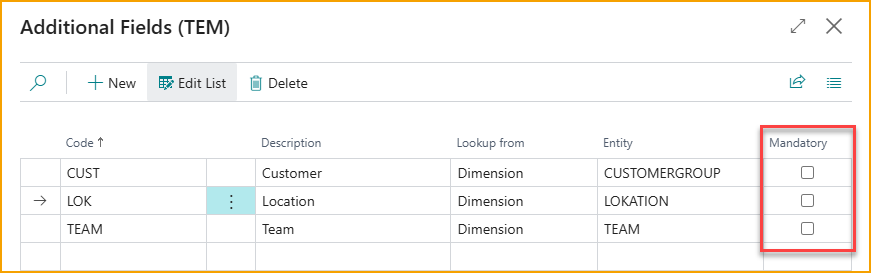
If default Dimension Values are defined on the Employee, these values will automatically appear in the portal or mobile app whenever the expense type or category is linked to the corresponding Additional Field. The default value will also satisfy mandatory-field requirements, removing the need for the user to select a value manually.
Per Diem
Two new countries have been added to the list of supported Per Diem calculations: Poland and Estonia.
In the German configuration, the Accommodation option is hidden when no amount is defined in the setup.
Copilots for easier onboarding
To simplify onboarding, we have added Copilots to assist with creating AppsForDynamics365 logins and Employees.
AppsForDynamics365 logins
From the Logins page, you can now export all logins to an Excel file, which is useful when moving data from a test environment to production.
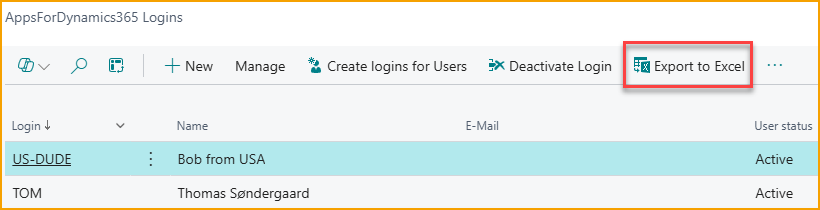
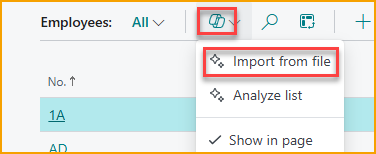
To import logins, either from an exported AppsForDynamics365 login file or from files exported from other system, use the Copilot “Import from file” function.
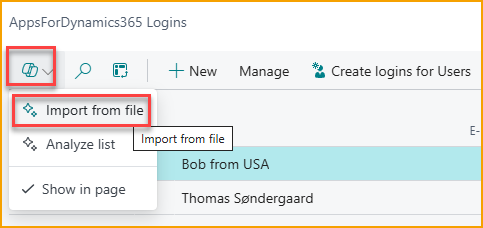
To import logins, use the Copilot “Import from file” function. You can attach either a CSV or an Excel file, and Copilot will automatically analyze the content to identify the relevant information.
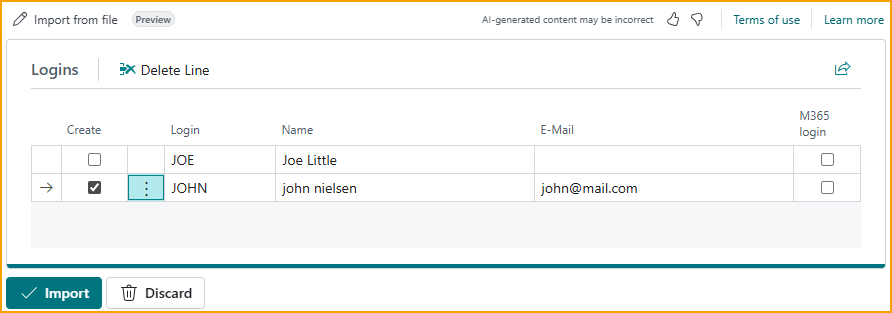
For example, a CSV file like this:
Username,First name,Last Name,Email
JOE,Joe,Little,
john@mail.com,john,nielsen,john@mail.com
will result in suggested logins as shown. If everything looks correct, simply select Import and the logins will be created.
Employees
A Copilot is also available to assist with importing Employees. Since employees are often not yet created in Business Central when organizations begin using Expense Management, and employees are required for the solution to function, this Copilot simplifies the initial setup.
Users can upload an Excel or CSV file, typically exported from the payroll system, and the Copilot will analyze the content and prepare the employees for creation. For example, a CSV file like this:
Employee No;Name;Email;Bank reg. No;Bank Account
1;John P. Doe;jd.company.com;1233;87119212
9;Mary Poppins;mp@company.com;8211;721231
will result in suggested employees as shown.
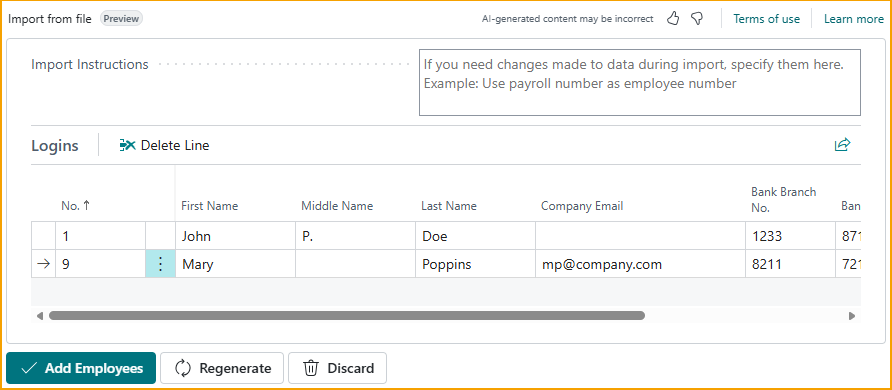
If the data is not mapped correctly, you can adjust the transformation by entering a prompt and selecting Regenerate.
For example, if you want the Employee No. to differ from the Payroll No., you can enter a prompt such as:
make the employee no the first two letters of first name and first two of last name
and the system will generate updated values accordingly.
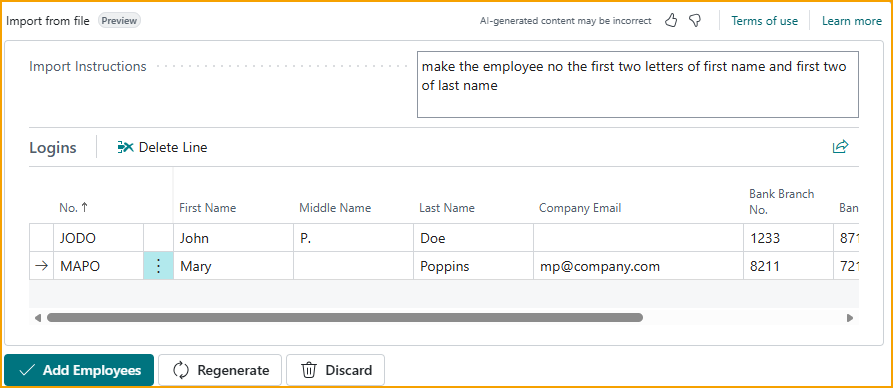
After reviewing the suggested records, the user can select Add Employees, and the employees will be created automatically.
SmartExtract
New configuration options have been added to SmartExtract AI processing.
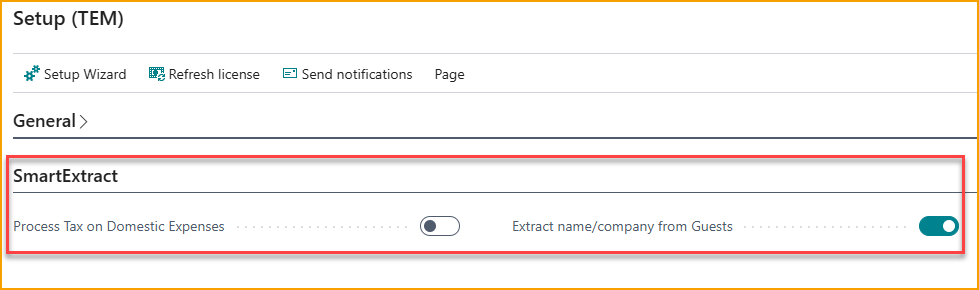
The setting “Process Tax on Domestic Expenses” applies to North America (USA and Canada) and determines whether SmartExtract should attempt to identify tax areas, taxable amounts, and non-taxable amounts, and update the expense accordingly. This function only applies to domestic expenses.
The setting “Extract Name/Company Name from Guests” converts the content of the Guest field on expenses into a list of individual “Full name / Company” entries instead of keeping the input as a single text field. Users can enter names one by one, or SmartExtract can automatically separate multiple names written on the same line into individual entries.
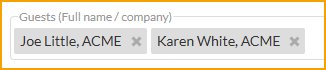

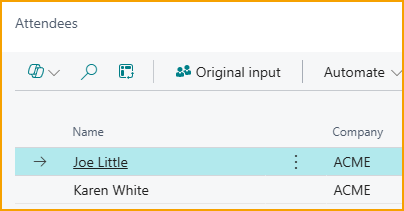
Regardless of how the guests are entered, the resulting expense card will display the attendees in a structured list.
SmartExtract can also recognize groups of people and automatically generate a corresponding attendee list.
For example, entering
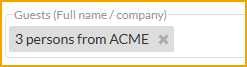
will produce an attendee list like this.
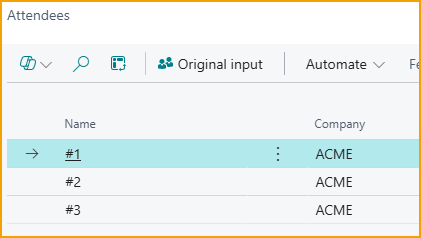
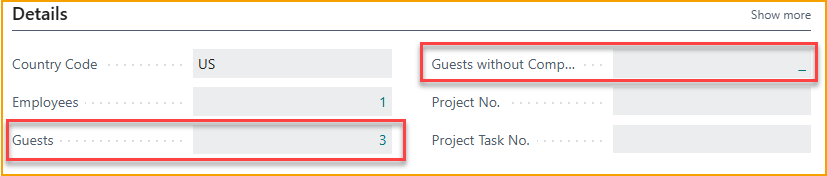
When the attendee list has been created, the expense card will show both the total number of guests and how many of them do not have a company name assigned. In countries where legislation requires both name and company information for client entertainment, this makes it easy to verify whether the data is compliant.
Expense Report
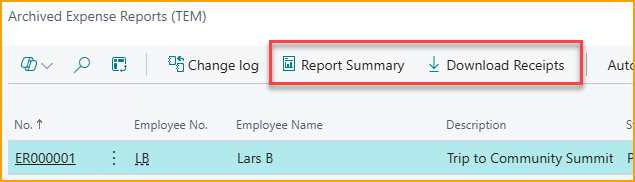
The Archived Expense Report list now includes options to generate a summary report and to download all receipts related to an expense report as a zip file.
This is useful for audits or when sharing expense details with external parties.
Reimbursement
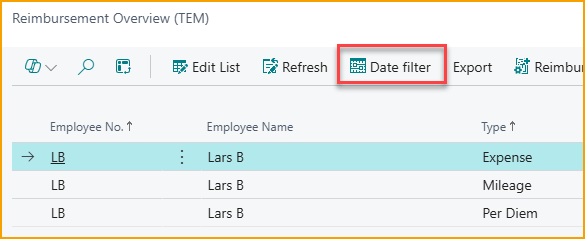
In the Reimbursement module, you can now filter items by a specific date interval. This is particularly useful when exporting data to a payroll system for a defined payroll period.
File Export has been added for the Danish payroll system Zenegy.
Categories
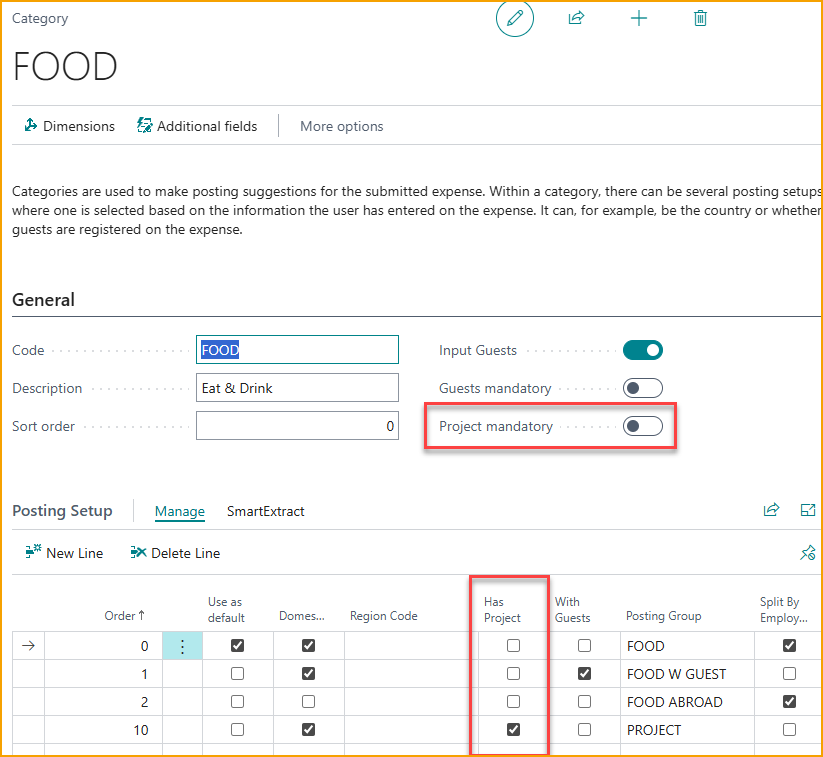
The category setup now includes options to require project registration on a category.
When project information is specified, whether mandatory or optional, it can be used as a parameter to select the appropriate posting setup for the expense.
Download receipts to Business Central
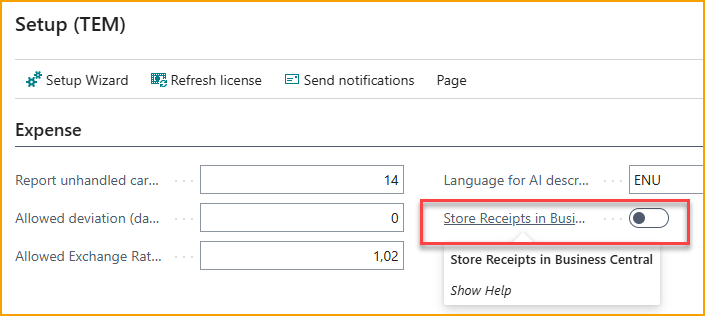
Normally, receipt images and PDFs are stored in the AppsForDynamics365 cloud to reduce storage usage in Business Central. If you also want to store receipts directly in Business Central, two options are now available.
From the Expense Management Setup page, you can enable automatic downloading of receipts to the ledger entries whenever an expense is posted.
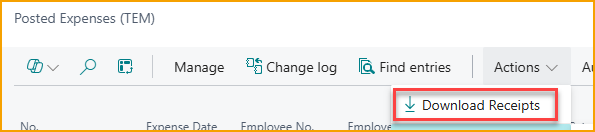
For expenses that were posted earlier, an action on the Posted Expenses page allows you to download the receipts and attach them to the corresponding ledger entries.
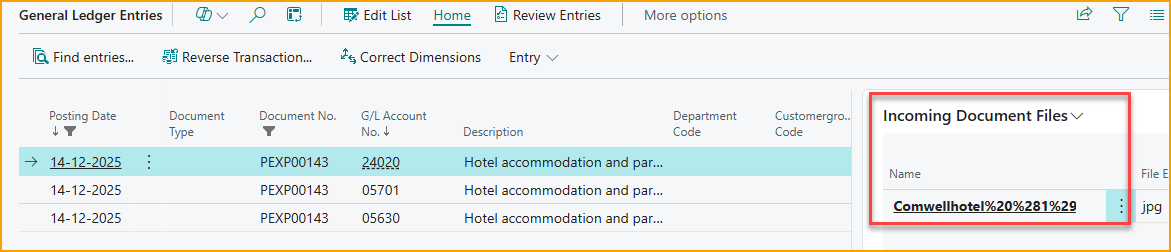
Once the receipts have been downloaded, they will be visible on the ledger entries when you view the related transactions.
Portal
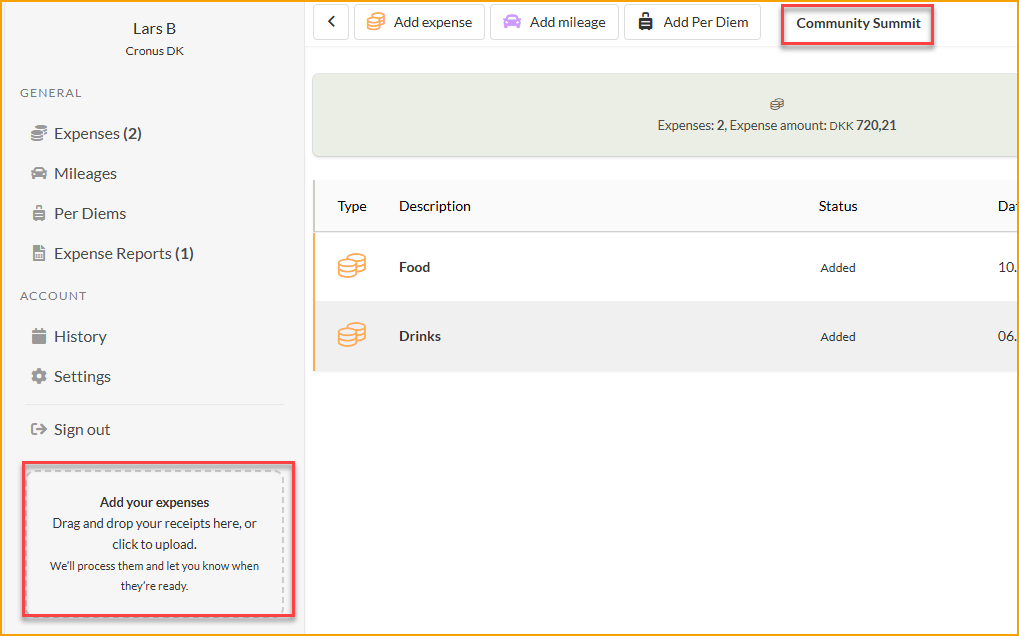
On the web portal, the Drag’n’drop feature has been improved. When an expense report is selected and you drag receipts onto the page, the receipts are now automatically added to the selected report.
On the Mobile Approval page, both multiple images and Additional Information are now displayed for the expense.
ExFlow Travel & Expense 4.0 – Release Notes
Type of Release
Major Release
Release Date
October 2025
What's New
We’re pleased to announce the release of ExFlow Travel & Expense version 4.0, featuring a range of updates designed to further streamline travel and expense management.
Key Highlights
• SmartExtract for AI-powered data extraction
• Nordea First Card integration
• Reimbursement via Vendor Payment
• Enhanced History Module with dedicated views
• Regional Features to support localized SmartExtract configurations
Users can access the updated web portal and mobile app immediately. To enable the new features, the app must be updated and configured within Business Central.
We hope these enhancements improve your experience with ExFlow TEM and make expense management even more efficient. Thank you for your continued support and valuable feedback.
Introducing SmartExtract
Smarter Expense Insights with AI
SmartExtract is an AI-powered feature that automates the extraction, classification, and allocation of expense details prior to posting. It helps finance teams ensure accurate application of G/L accounts, deferral schedules, and tax treatment during expense processing.
Key Capabilities for Finance Teams
• Automated Line-Item Extraction
SmartExtract can break down a single receipt into multiple expense lines based on category and tax rules. For example, a hotel invoice may be split into accommodation, breakfast, and parking.
• AI-Based Subcategorization
When expenses are submitted under broad categories (e.g., “Travel”), SmartExtract uses AI to assign them to more specific subcategories such as “Taxi,” “Flight,” or “Hotel,” based on your organization’s expense structure.
• Deferral Handling
Expenses like subscriptions can be deferred through configurable templates, supporting compliance with accounting policies.
• Receipt Intelligence
Manual interpretation of receipts is no longer required. SmartExtract automatically extracts relevant data and applies appropriate categorization and tax treatment.
SmartExtract integrates with your existing Travel & Expense setup and can be enabled selectively.
CONFIGURATION GUIDE
Splitting Receipts into Multiple Lines
To configure SmartExtract for line-item extraction:
- Navigate to the relevant Expense Category (e.g., Hotel).
- Select the appropriate posting rule.
- Open the SmartExtract menu and click Configure.
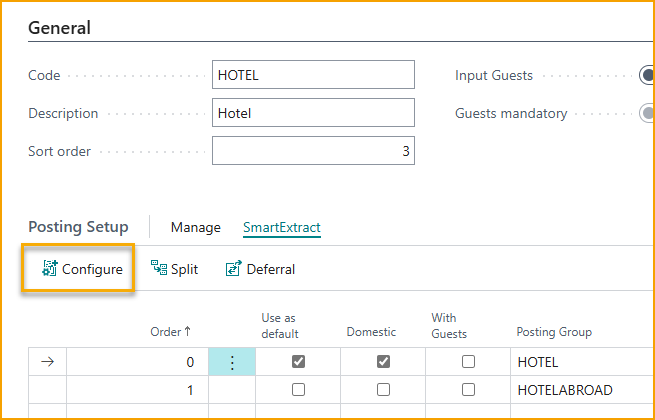
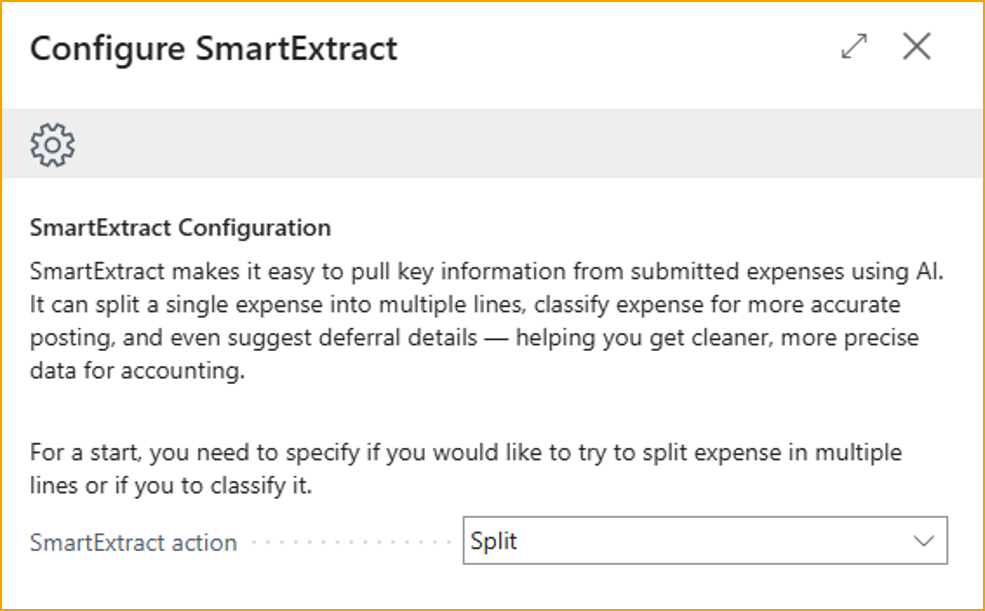
- Choose to split expenses into multiple lines or classify them for more accurate posting.
- Reference Posting Groups to define the details for each item (e.g., Parking, Breakfast).
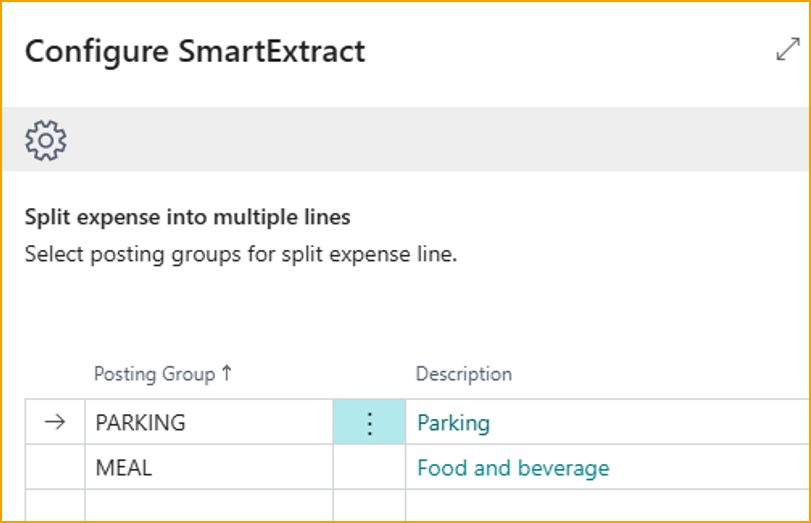
Once configured, SmartExtract will automatically extract these details from future receipts submitted under the Hotel category.
Classifying Expenses
To simplify user-facing categories while maintaining detailed financial records:
- Use a general category like “Travel.”
- In SmartExtract, select Classify.
- Define Posting Groups for subcategories such as Flight, Taxi, Train, etc.
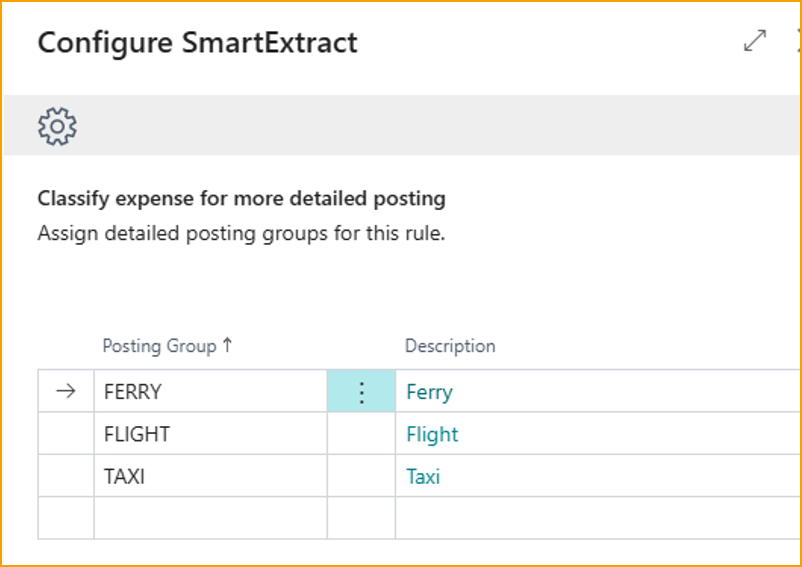
SmartExtract will attempt to classify each expense based on receipt content. If no match is found, the default posting rule will apply.
Applying Deferral Templates
SmartExtract can suggest deferral templates based on expense duration:
- Configure each category with applicable deferral templates.
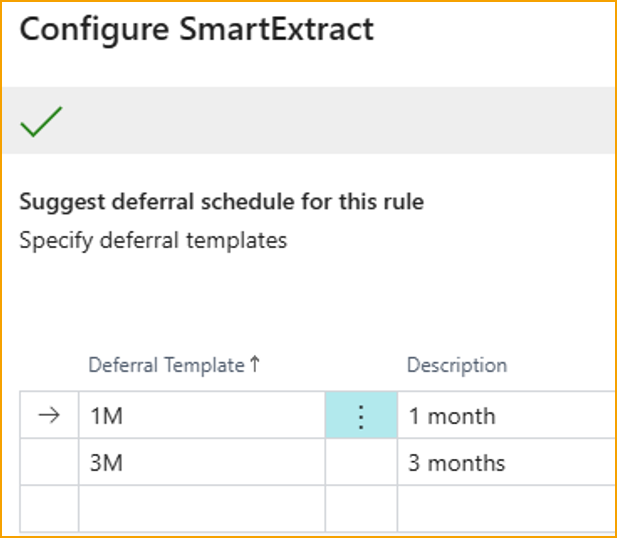
- When an expense is submitted, SmartExtract will identify relevant dates and apply the matching template.
SmartExtract best practices
To optimize SmartExtract performance:
• Assess where SmartExtract adds value. In most cases, it is most effective when applied to domestic expenses, where receipt formats and tax rules are more predictable. Consider defining specific scenarios or categories where automated extraction will improve accuracy or reduce manual effort.
• Use clear, natural language in Posting Group descriptions. For example, “Food and beverage” is more effective than “Meals, Personnel.”
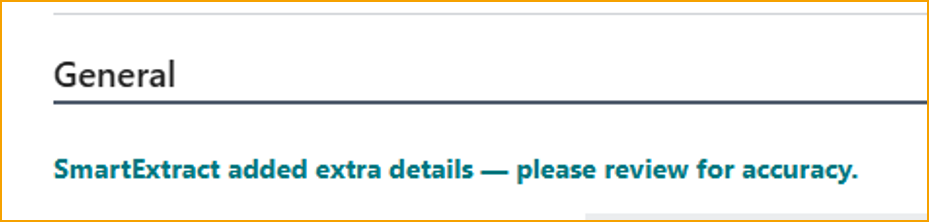
• Be aware that AI-based extraction may occasionally return incorrect data. A notice will appear on the expense card for any item processed by SmartExtract.
The Regional Features section provides additional information relevant to specific countries, offering localized insights and configurations.
USER EXPERIENCE AND USABILITY
Receipt viewer in FactBox
You can now display the receipt viewer directly in the FactBox area, making it easier to review receipts alongside expense details. To switch between Fast Tab and FactBox placement, use the View menu on the Expense card.
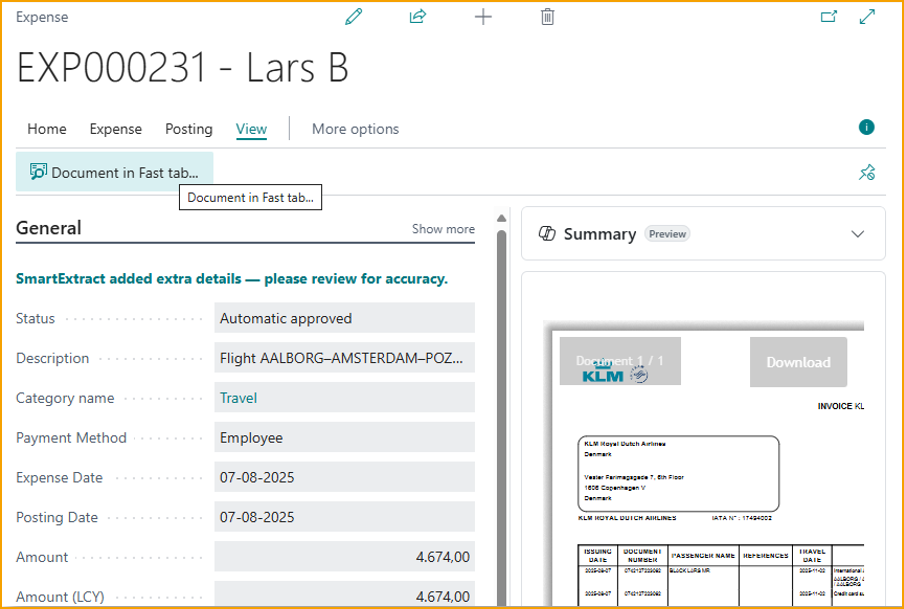
Please note: After changing the placement, close and reopen the Expense Card for the update to take effect.
Drag & Drop receipts in Portal
In the portal, simply drag and drop one or more receipts (PNG, JPG, or PDF) onto the designated area to create expenses automatically. Our AI will extract the receipt information, just as it does in the mobile app.
Enhanced History Module
The history module has been updated with dedicated views tailored to specific use cases:
• Reimbursement View: Easily check whether your expenses have been reimbursed by accessing a view that displays only reimbursement-related entries.
• Processing View: Track the status of submitted expenses that are still being processed. This view shows all in-progress items without applying date filters.
In addition to these views, you can now filter expenses by type or status, allowing for more targeted review and analysis.
Automatic sending from Mobile app
When you submit an expense using the mobile app, it is now uploaded to the server instantly (when online), eliminating the need for manual synchronization by the user.
REIMBURSEMENT IMPROVEMENTS
Configure file export
For selected Payroll exports, it is now possible to configure what Payroll codes should be used for specific expense types.
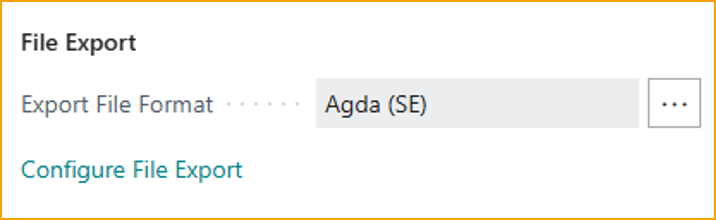
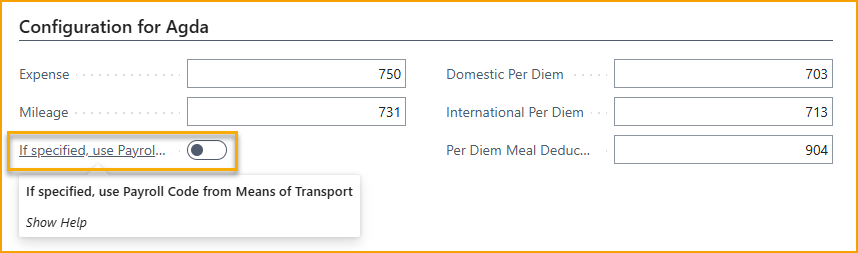
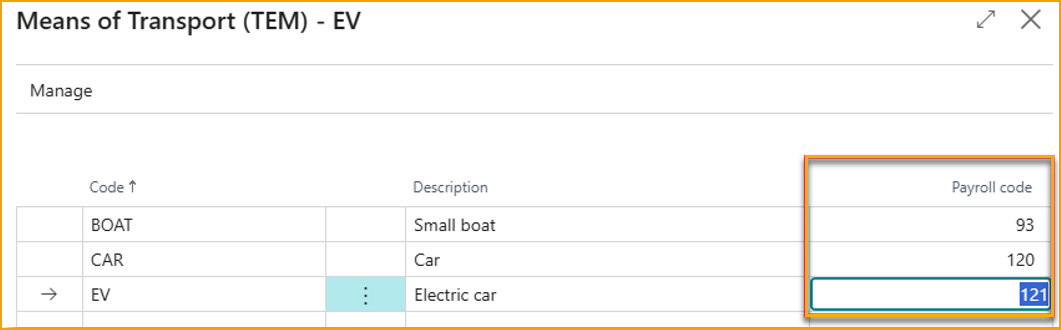
Additionally, if you need different Payroll codes for different vehicle types, these can be specified in the Means of Transport and used for the export.
Reimburse via Vendor payments
Some Business Central payment modules are not compatible with Employee Payments or require significant customization.
With this update, you can now reimburse employees via Vendor payments. Simply assign an employee-specific Vendor Number on the Employee card and select "Vendor" as the reimbursement method on the Reimbursement Setup page.
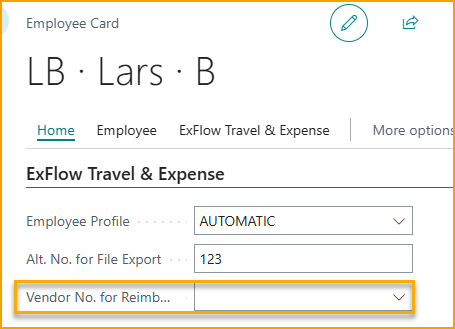
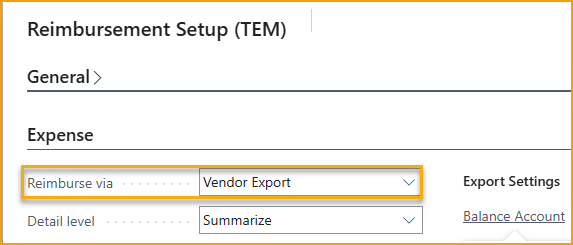
When processing reimbursements, a Vendor Payment entry is automatically created for the outstanding amount, allowing you to handle the payment just like any other vendor payment.
Summary emails
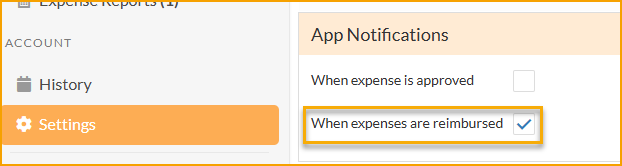
If users have enabled Reimbursement notification in the Settings page, additional to push notification to the app, now they will also receive an email with details whenever a reimbursement is made to them.
LOCALIZATION & REGIONAL FEATURES
Nordea First Card integration
Now available in the Nordic countries, Travel & Expense supports real-time transactions for Nordea First Card credit cards.
When a transaction occurs, users receive a pop-up notification in the app within seconds, enabling them to instantly attach a photo of the receipt or respond quickly to potential fraud alerts.
Visible Field adjustments
To enhance regional compliance, Travel & Expense now dynamically adjusts visible fields based on the Business Central company’s location. For companies based in North America, tax-related fields will be displayed, while companies in other regions will see VAT-related fields.
Swedish meal VAT Deduction Support
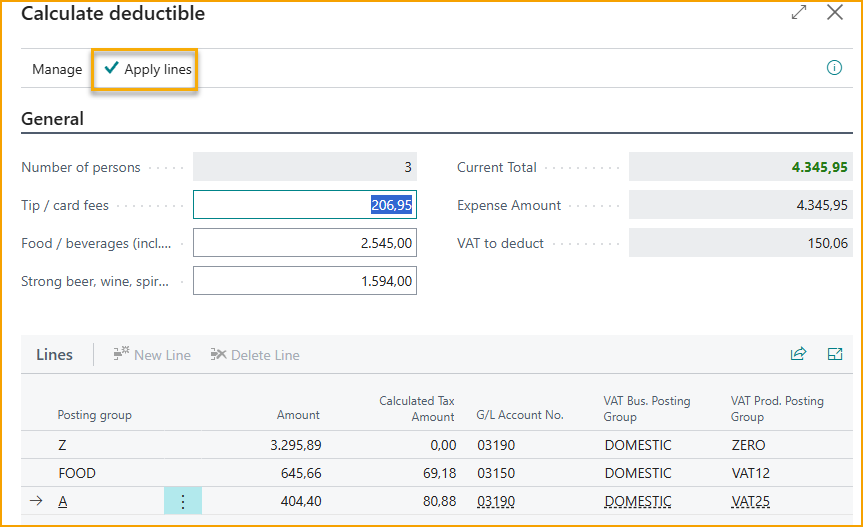
When the Business Central company is registered in Sweden and SmartExtract is configured with posting groups aligned to Swedish meal deduction rules—specifically 12% VAT for food, 25% for alcohol, and 0% for other items—a dedicated button becomes available.
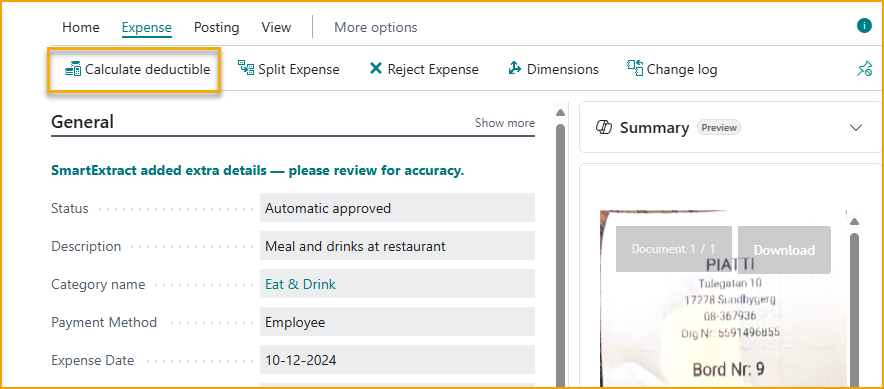
This feature allows users to automatically calculate eligible VAT deductions in accordance with Skatteverket’s regulations. Once the calculated lines are applied, the expense is adjusted to reflect the correct VAT treatment.
Canadian Tax handling
When the Business Central company is registered in Canada, SmartExtract automatically applies the appropriate Tax Area to each expense—without requiring any additional configuration. It detects whether the expense is subject to tax and selects the correct Tax Area from the list defined in Business Central.
ExFlow Travel & Expense 3.0 – Release Notes
Type of Release
Major Release
Release Date
April 2025
What's New
We are excited to introduce the latest updates and enhancements to our ExFlow Travel & Expense solution, version 3.0, packed with new features and enhancements designed to further streamline your travel and expense management processes.
Highlights
• Employee profiles
• Expense policies
• Multi-level approval
• Delegated expense management
• Real-time alerts during approval
• Improved history view
• Configure category-specific fields for expenses
• Enhanced mobile app with Per Diem and AI assistance
• New portal look and feel
Your users can access the new web portal and mobile app right away, but to use the new features, you'll need to update and configure the app in Business Central.
We hope these new features and improvements will enhance your experience with ExFlow TEM and make managing expenses even more efficient. Thank you for your continued support and feedback.
EMPLOYEE PROFILES
To manage different groups of employees with varying expense rules, we have introduced Employee Profiles.
An employee profile defines rules and approval policies for all employees assigned to that profile. This can include approval rules; which expense categories they can see, or the spending limits for individual categories.
You can create as many Employee Profiles as needed to match your organization.
In this example, a profile is created for the Sales team with special approval policies for a few expense categories and for expense reports. Also, for the Sales Team, the expense category of Car Maintenance is not available.
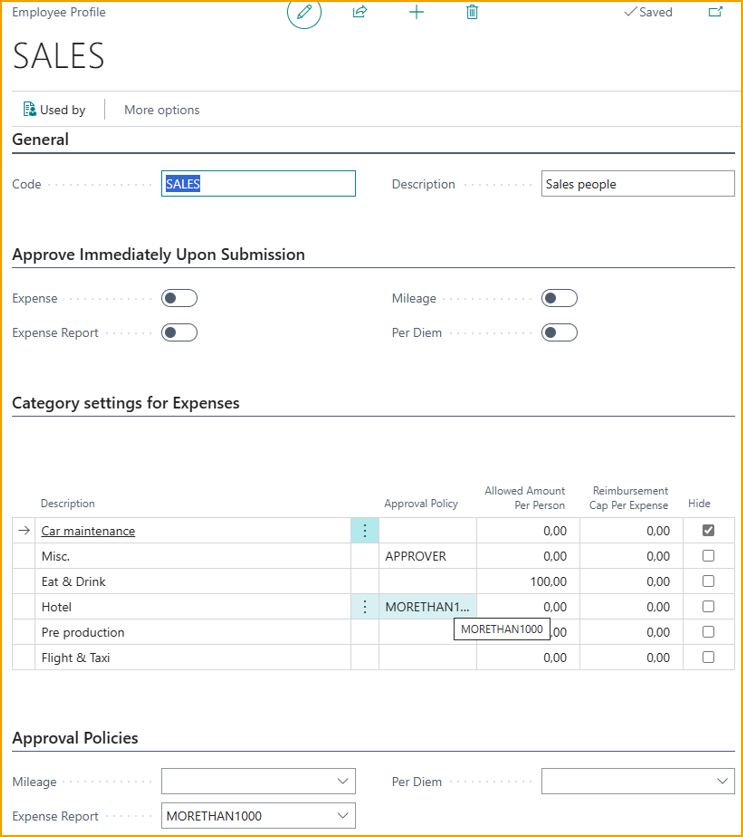
During the upgrade from Travel&Expense version 2, Employee Profiles were created and assigned to employees based on their approval setup. A profile “NORMAL” is create for employees with normal Manager approval. If any employees were setup for automatic approval, a profile “AUTOMATIC” is also created.
EXPENSE POLICIES / MULTI-LEVEL APPROVAL
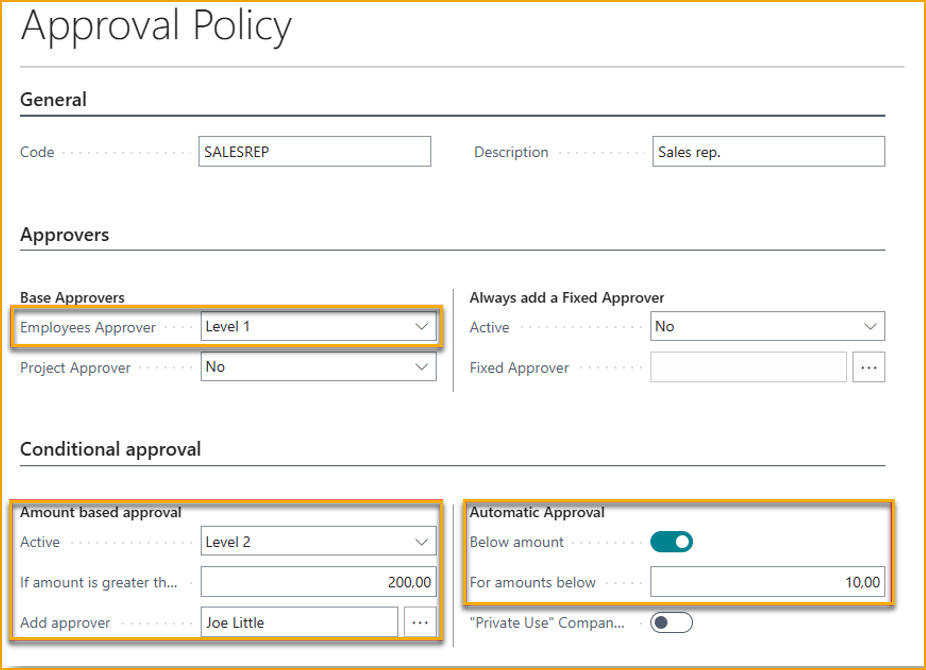
Expense policies allow for the definition of various sets of rules for how expenses should be approved. You can create as many policies as needed. For example, the management team may have higher spending limits before an additional approver is required, or you have situations where expenses in a specific category should always be approved by the same person, unrelated to who is submitting the expense.
Approvers can be specified at up to three levels based on different criteria, and there can be multiple approvers at the same level. Only when all approvers at one level have approved, the expense is sent for approval at the next level.
Expense policies must be linked to individual employee profiles.
In the example below, a policy is created for salespeople, stating that their manager must first approve, and if the amount exceeds 200, Joe Little must approve.
Additionally, if the expense is less than 10, it is automatically approved so that the approver does not waste unnecessary time on minor expenses.
DELEGATED EXPENSE MANAGEMENT
Delegated expense management allows a user to manage expenses on behalf of another employee, such as a personal assistant who handles expenses for the management team.
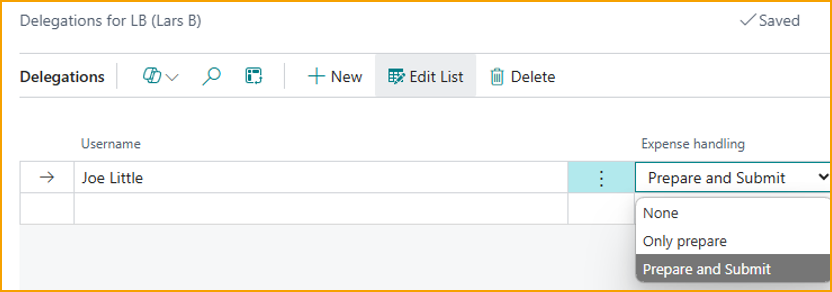
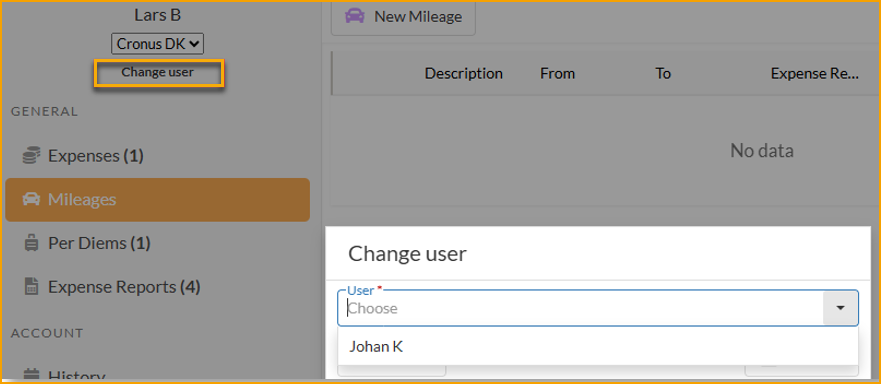
Once a user is set up as a delegate, they have the option to switch to another user on the portal or mobile app and create/submit expenses on their behalf, depending on what rights have been assigned.
REAL-TIME ALERTS DURING APPROVAL
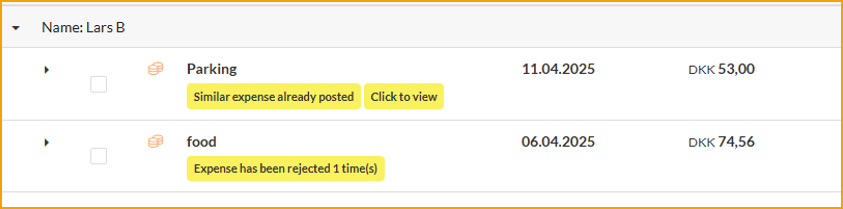
To provide approvers with better insight into what they need to approve, real-time alerts will now be displayed during the approval process. These alerts can include potential duplicates, policy violations, or previously rejected expenses.
This functionality provides real-time alerts to approvers when expenses submitted for approval do not comply with predefined company policies. The system automatically scans each expense report for discrepancies and if any non-compliant expenses are detected, the approver receives an alert, allowing them to review and address the issues promptly.
CUSTOMIZABLE FIELDS ON EXPENSES
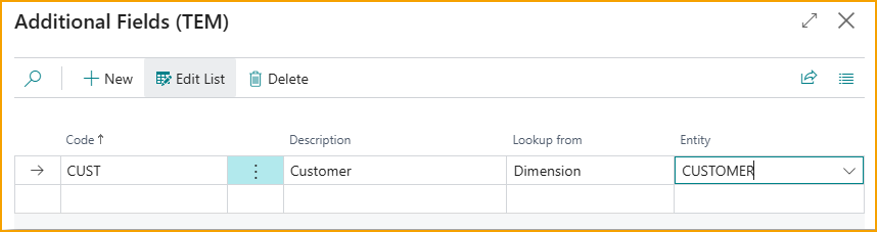
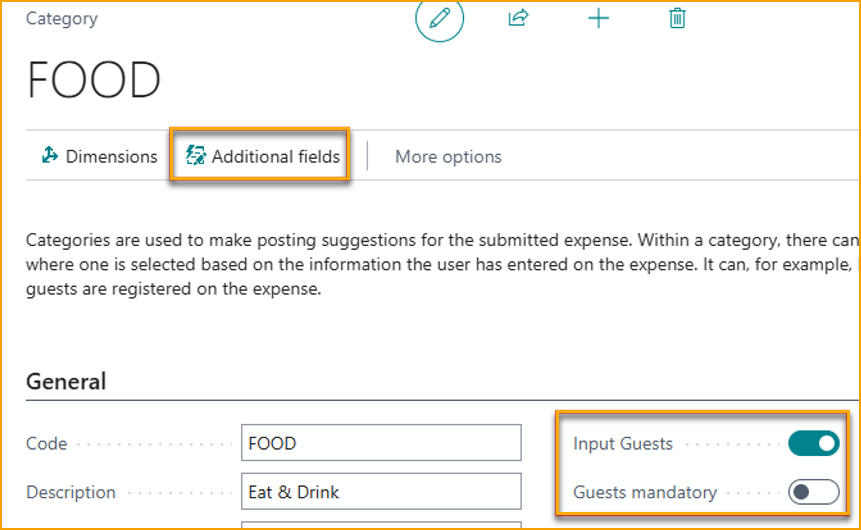
It is now possible to customize which fields are displayed for a specific expense category. You can specify whether guests should be registered for the category, and it is also possible to register dimension values via the "additional fields" module.
It is possible to have different fields for different categories.
IMPROVED FOLLOW-UP FOR EMPLOYEES
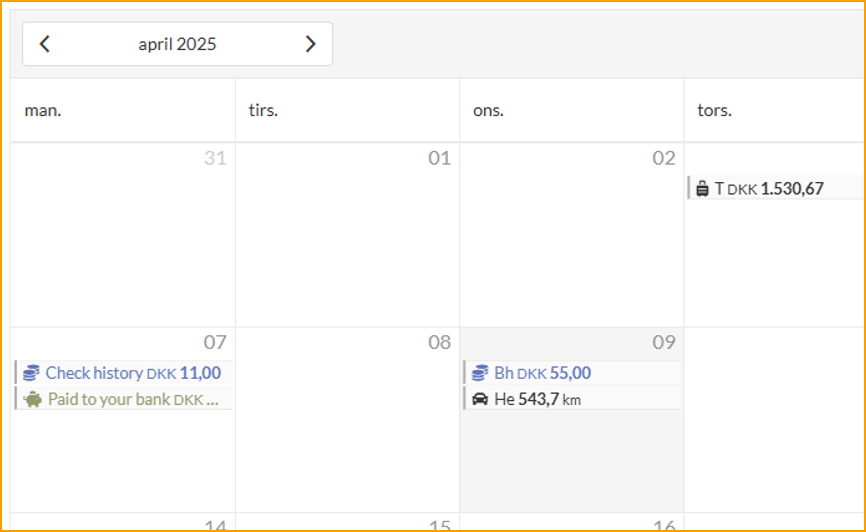
When employees need to check the status of their submitted expenses, there have been requests for a quicker overview of expenses and whether they have been reimbursed. Based on user feedback, we have introduced a new calendar-based history view, where you can quickly see if expenses have been approved/reimbursed and when the reimbursement occurred.
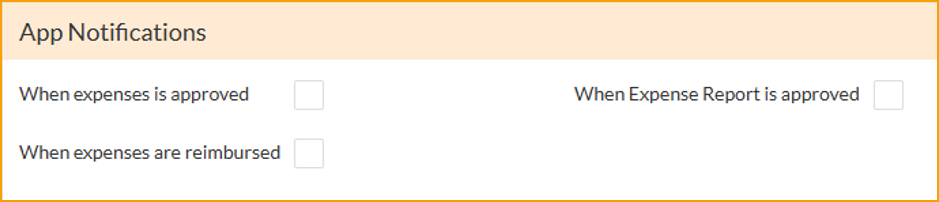
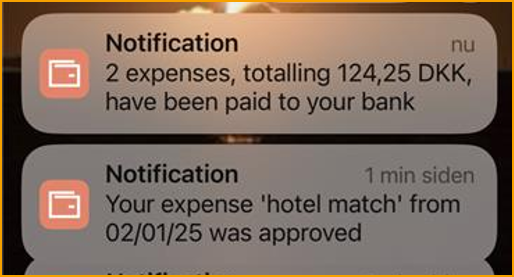
At the same time, we also made it possible for the user to enable push-notification to the mobile app to let them know when expenses are approved and when reimbursement has taken place.
ENHANCED MOBILE APP
In the mobile app, it is now possible to create Per Diems.
We have also improved the use of AI, so that when a picture is taken or a PDF is uploaded, in addition to reading the date, amount and currency, a suggestion for expense description and the best category will also be made.
OTHER CHANGES
Submit to multiple Business Central companies
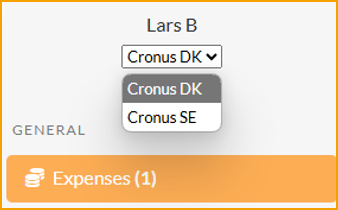
If an employee needs to submit expenses to multiple companies, it is now possible to connect the same login to employees in different companies.
On the portal / mobile app, it will be easy to switch between the companies.
Option to register currency conversions on an expense
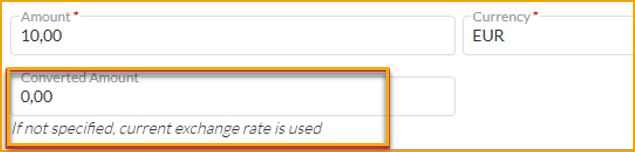
If an employee incurs an expense in a foreign currency and pays out of pocket, the exchange rate in Business Central has been used for reimbursement until now. In some situations, this has been a disadvantage for employees due to potential currency conversion fees. It is now possible for the employee to specify the converted amount. If not specified, the exchange rate from Business Central will be used.
More detailed options for re invoicing expenses via Projects
When using Projects, it is now possible per expense type to specify if they should be invoiced or not.
Preview posting
Preview Posting have been added to expenses, mileages and per diems.
BUG FIXES
Expense Reports will now show in notification emails.
Credit card numbers less than 4 digits would fail.
Renamed “Payment Groups” to “Balance Types” as this is more correct term.
ExFlow Travel & Expense 2.0 – Release Notes
Type of Release
Major Release
Release Date
October 2024
What's New
We are excited to introduce the latest updates and enhancements to our ExFlow Travel & Expense solution, version 2.0.
This major release brings a host of enhancements designed to streamline expense reporting, improve user experience, and increase overall efficiency. With a focus on both user and administrator needs, this update promises to deliver a more intuitive and powerful tool for managing travel and expenses. From enhanced user interfaces to new mobile applications, these updates reflect our commitment to continuous innovation and excellence.
Highlights
• Expense Reports for better expense tracking
• Per Diem support with flat daily allowance and Finnish/Swedish calculation rules
• New module for seamless reimbursements via payment journal or export to external systems
• Enhanced web portal user interface
• Better mobile device approval
• New Android and iOS mobile app
• Enhanced Excel import of card transactions
• More detailed options for re-invoicing expenses via Projects
• Improved support for “Progressus Advanced Projects” add-on
Your users can access the new web portal and mobile app right away, but to use the new features, you'll need to update and configure the app in Business Central.
EXPENSE REPORTS
Expense Reports allow you to organize Expenses, Mileages, and Per Diems to gain a summary of outlays.
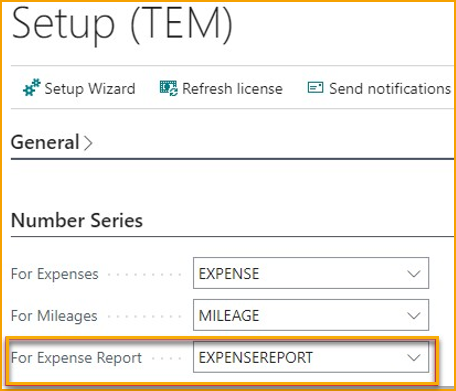
Enabling Expense Reports is straightforward, just navigate to the Setup page and add a Number Series for Expense Reports.
When logging into the portal or mobile app, users can create an Expense Report, add expenses, and submit it.
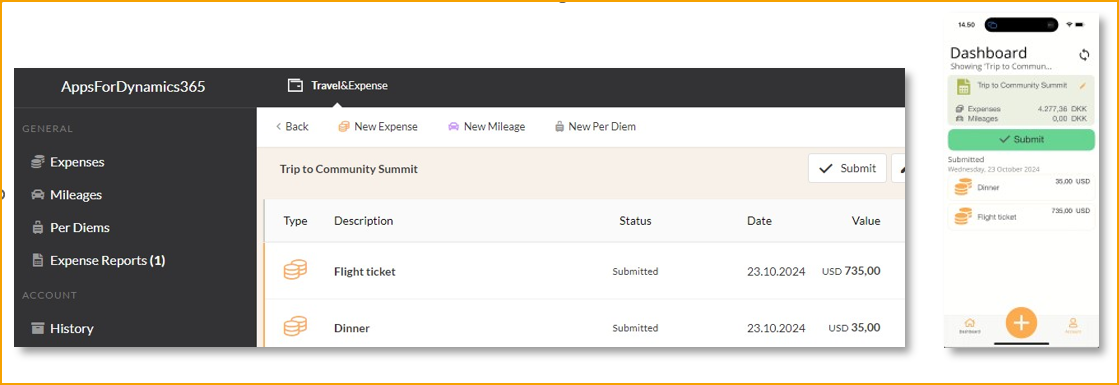
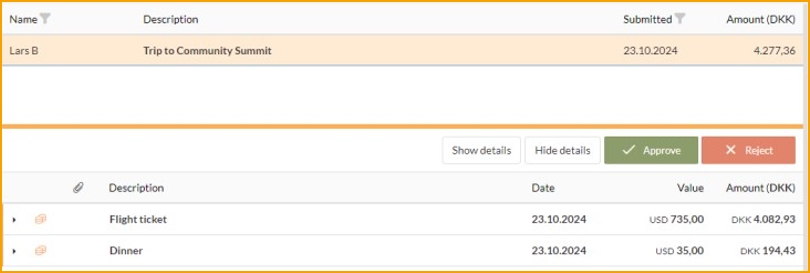
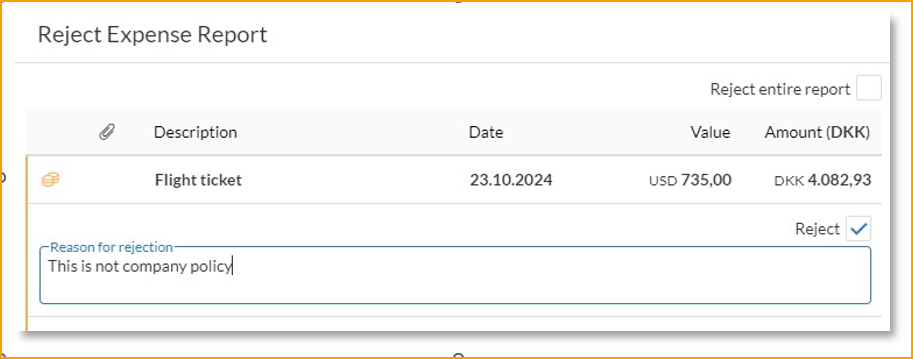
Once the Expense Report is submitted, the approver receives a summary and can approve it all at once or reject all / parts of it.
PER DIEMS
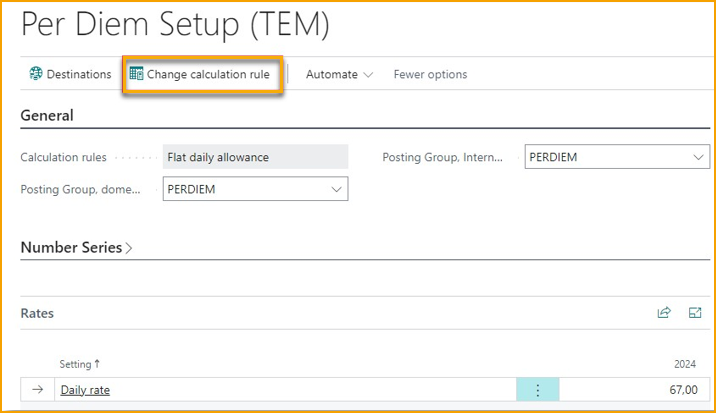
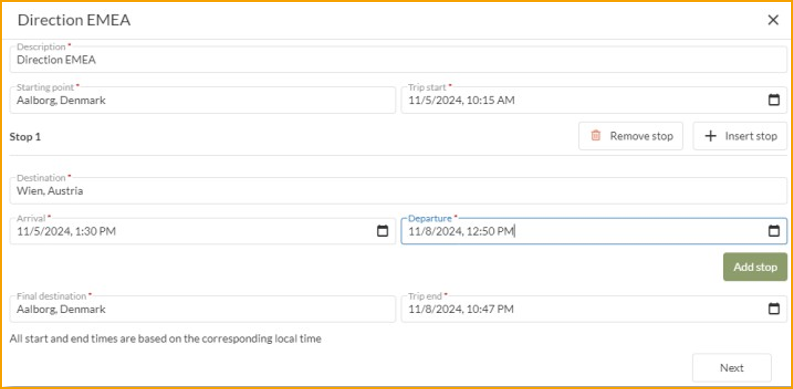
Per Diems are daily allowances provided to employees to cover day-to-day expenses incurred during business travel. They simplify the process of expense tracking by offering a fixed amount. Rules for calculating Per Diems varies from country to country and for now, we support 3 set of calculation rules: Swedish, Finnish and a general “flat daily rate” rule. Depending on the selected rule, you will have different settings to configure.
Calculation rules are configured in the Per Diem Setup page (only available in the Pro edition)
When Per Diem is configured, the employee can create Per Diems from the web portal. Currently, Per Dimes is not available from the mobile app, only the web portal.
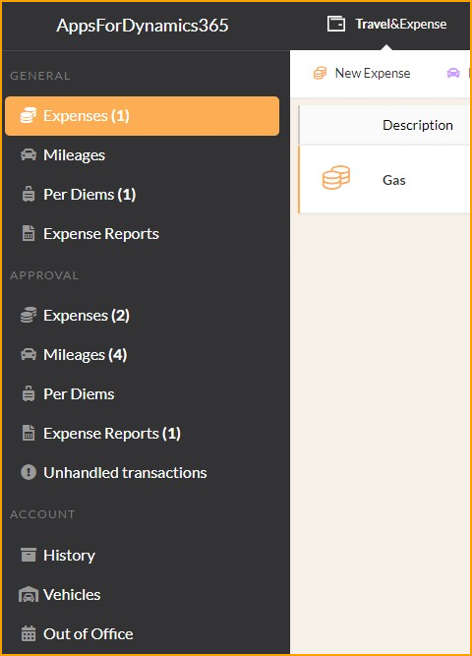
ENHANCED WEB PORTAL USER INTERFACE
The web portal's user interface has been upgraded to include new Expense Report and Per Diem features. Now, instead of a single consolidated list, the sidebar displays menu items for each configured feature, applicable to both submitting and approval.
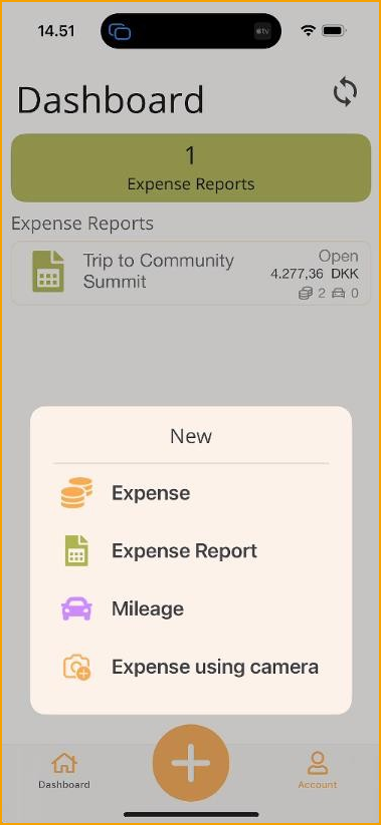
NEW MOBILE APP
The new Mobile App features an updated user interface that provides a clearer view of pending items.
The big + button at the bottom provides quick and simple access to create new items in the app.
If an Expense Report is selected while creating a new item, it will automatically be included in the chosen report.
The "Account" menu includes personal options such as Vehicles, History, and Company Cards.
REIMBURSEMENT
When expenses need to be reimbursed, it can be done either by using the Payment Journal in Business Central or by exporting data to external systems, typically payroll systems.
To make this process more manageable, there is now a module to provide an overview of which expenses need to be handled and how.
In the Reimbursement Overview, clicking Suggest Entries provides a consolidated view of reimbursements.
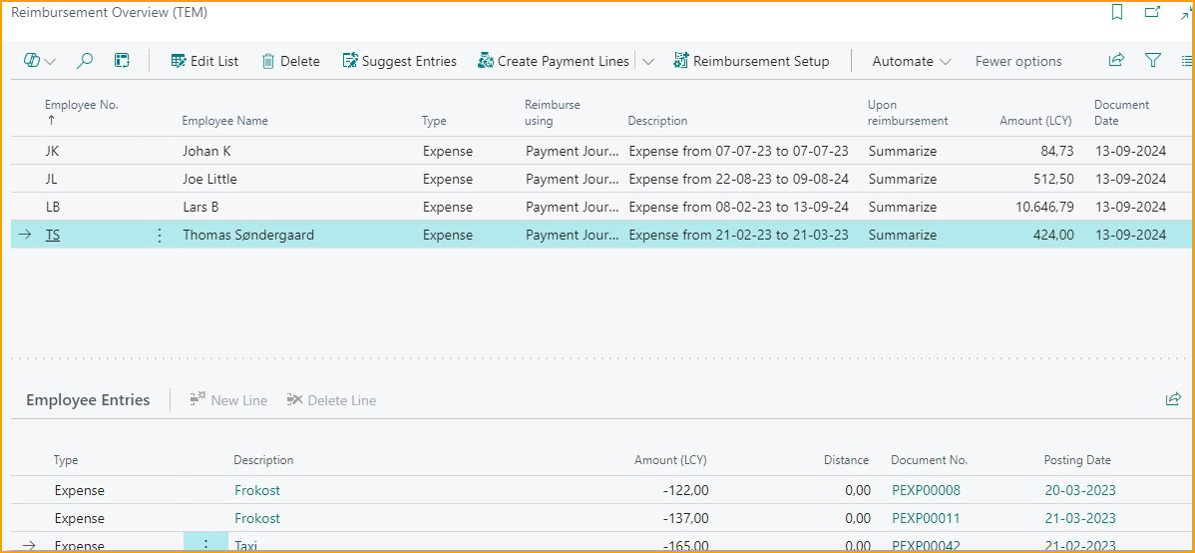
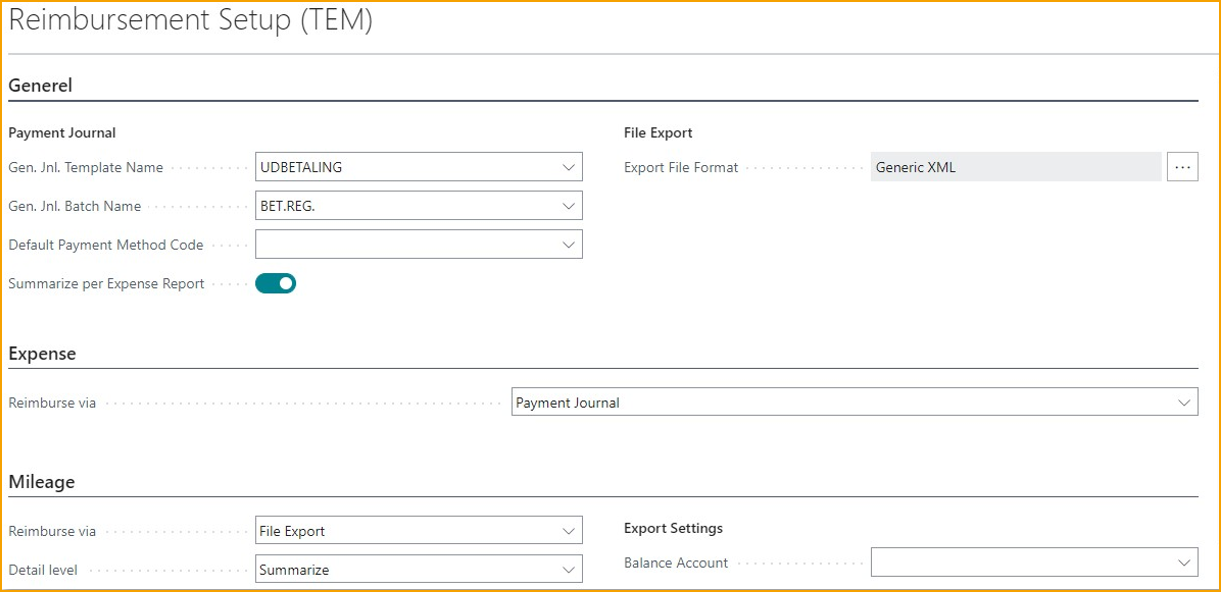
To change how reimbursements are processed, go to the Reimbursement Setup to configure details per expense type.
MINOR CHANGES
Improvement to Excel import of card transactions
When importing card transactions using Excel import, currency and country names are now matched against descriptions as well if the import file does not use standard ISO codes.
Additionally, you can now import invoice no./statement no. from the file as well.
More detailed options for re-invoicing expenses via Projects
When invoicing expenses to clients using the Project module, you will now have more detailed control over which expenses can be billed on the project.

Improved support for Progressus Advanced Projects
If you are using the “Progressus Advanced Projects” add-on for Business Central and want to re-invoice expenses, it offers enhanced project configuration with task-level settings determining the invoiceability of expenses. These settings are automatically recognized when posting expenses.