Expense Management 4.6
Release date: July 2026 - Minor Release
Approval
-
Substitute approvers for time off. When an approver is out of office, a substitute can now approve on their behalf so nothing gets stuck. Substitutes can be set up even for approvers who aren't Business Central employees (for example, external approvers), and a new Approver Substitutes overview manages them all in one place.
-
Approvals on behalf of someone else are now recorded. When a substitute or delegate approves for another person, it's clearly logged who actually approved the document.
-
See who still needs to approve. Documents in the approval process now show the pending approver(s), so employees and finance can see exactly who a document is waiting on.
-
Approver history in the portal. Approvers now have a Reviewed by me option in the portal to search back through the expenses they've previously approved or rejected, making it easier to review past decisions.

Expense
-
Recall a submitted document. Employees can now pull back an expense, mileage, or per diem they've already submitted - as long as it hasn't been posted yet - to fix a mistake themselves instead of asking finance to reject it. In the portal, open the document from your history / Bring processed list; if its status allows, a Recall button appears in the side panel. Once recalled, you can edit and resubmit the document, or delete it if it was a duplicate. You can only recall your own documents.

-
Balance lines are better protected against accidental edits.
Mileage
- Different mileage posting per means of transport. You can now post mileage to different accounts depending on the means of transport (for example, car versus bicycle), giving finance more precise control over how mileage is booked.
Portal
-
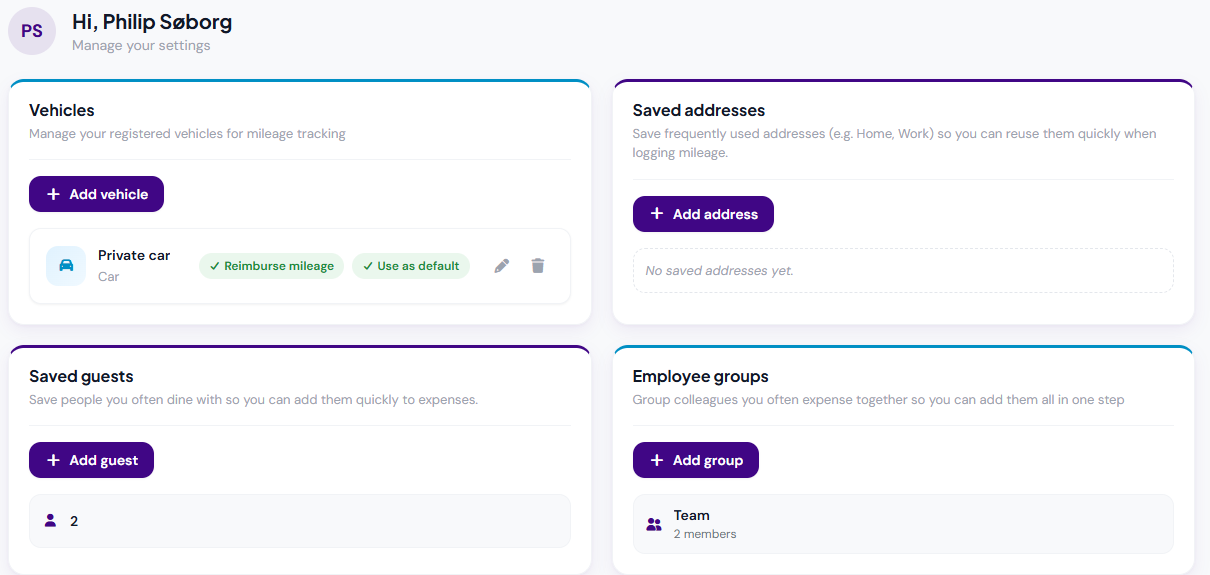
Saved addresses and guests, and employee groups. In the portal under Settings, employees can now save frequently used addresses and guests for quick reuse when creating expenses. You can also create employee groups to add everyone from a team (or any set of colleagues you often expense together) in a single step.
When creating an expense, a saved group appears as a Quick add button that adds every member in one click.

-
Show me around. Some portal pages now have a question-mark (?) help icon in the top-right corner. Clicking it starts a Show me around guided walkthrough of the page.

Reimbursement
- Safer payment export. When sending reimbursements to vendor accounts, TEM now checks for blocked dimension combinations up front and clearly explains which entries can't be paid and why, instead of stopping without a clear reason.
Employee
- Guided employee removal. Removing an employee from Expense Management now uses an improved step-by-step wizard. Before anything happens, it shows any blocking issues that must be resolved first (such as open items, assigned company cards, or delegations) and then clearly lists everything that will be done - approvers reassigned, cards unassigned, delegations removed. This replaces the old bulk-removal action with a clearer, safer one-employee-at-a-time flow.
- Better handling of inactive employees. Portal and app access now stays in step with an employee's status automatically. Inactive employees can no longer be impersonated, set as an approver, or used as a delegate, and the system prevents documents from being submitted to an approver who is inactive or no longer exists.
- Delegations overview shows everything. The delegations view now shows all delegations a person holds, rather than a filtered subset.
Text and wording
- Clearer, more consistent wording. A broad review of on-screen text: corrected spelling and grammar, made buttons, section headings, and field labels consistent, improved several messages, and renamed "AppsForDynamics365 login" to "AppsForDynamics365 account" throughout for clarity.