Export to payroll
Goal
Generate a payroll file containing reimbursable expenses, mileages, and/or per diems for processing by your payroll provider.
Before you start
- Reimbursement method must be set to File Export in Reimbursement Setup for the relevant expense types
- Each employee must have Alt. No. For File Export set on their Employee Card if the payroll system uses a different identifier than Business Central's employee number
- The correct payroll format must be configured in Reimbursement Setup (e.g. Visma, Agda, Zenegy, Generic XML)
- Expenses must be posted before they appear in Pending Reimbursement
Steps
-
In Business Central, go to Pending Reimbursement
-
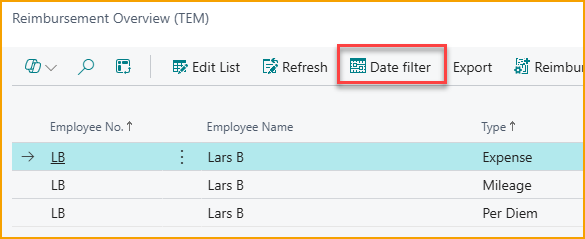
Optionally set a date interval to limit the export to a specific payroll period
-
Click Reimbursement → Export and Post
- Use Export Without Posting if you want to inspect the file before committing
-
The file downloads to your downloads folder in the configured format
-
Send the file to your payroll provider using your standard process
What to check
| Check | What it means if wrong |
|---|---|
| All expected employees are in the file | Check that Alt. No. For File Export is set on each employee card |
| Payroll codes match your payroll system's expected codes | Check the payroll code mapping in Reimbursement Setup |
| Amounts are correct | Verify whether Summarize or One Each Line is configured - One Each Line creates one row per expense |
| File imports cleanly into payroll | If the payroll system rejects lines, confirm that payroll codes and employee identifiers are correct |
Related
- How-to: Process reimbursements
- Reference: Reimbursement setup
- Reference: Employee setup
- Best practice: Reimbursement method selection