Login list page
Business Central search: AppsForDynamics365 Logins
Lists all portal login accounts in the Business Central environment. Because logins are cross-company, this page shows the same records regardless of which Business Central company you are working in.
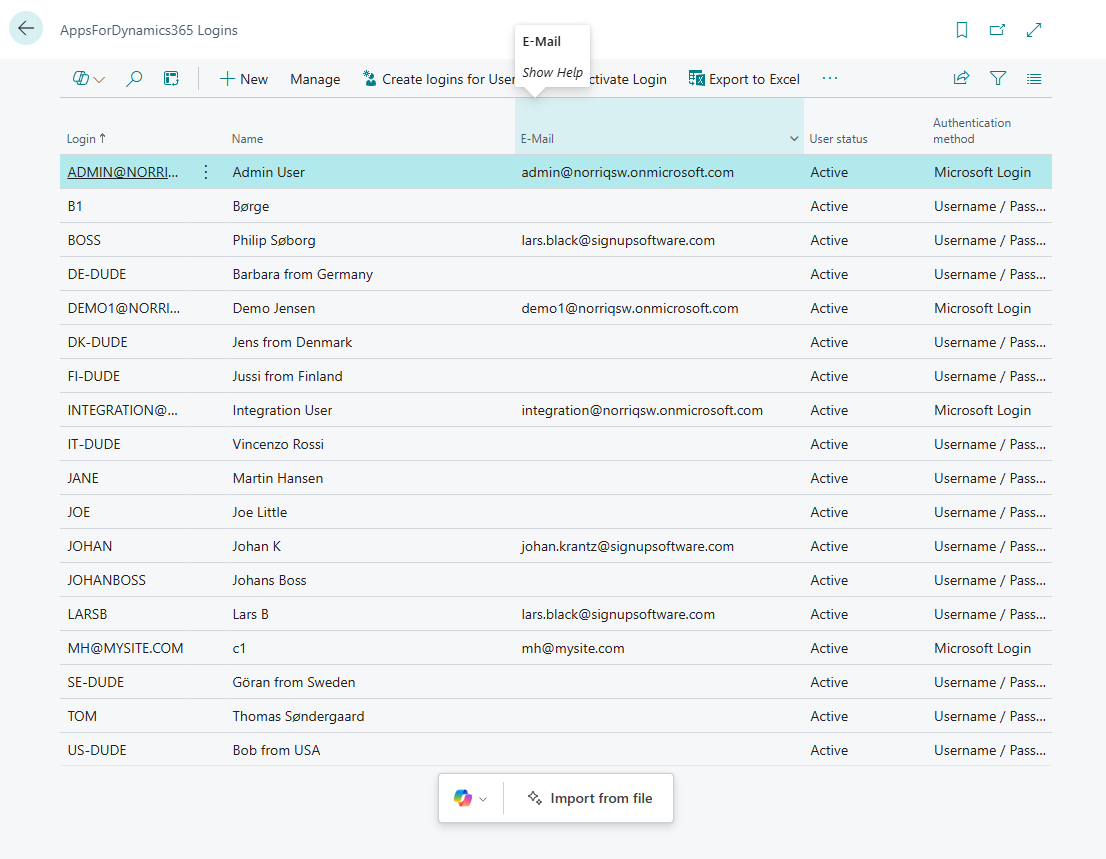
Columns
| Column | Description |
|---|---|
| Login | The username the employee uses to sign in to the portal. Microsoft Login users show their email address. |
| Name | The employee's display name. |
| Used for notification delivery. | |
| User status | Active, Inactive, or PendingDelete. |
| Authentication method | Microsoft Login or Username / Password. |
Actions
| Action | Description |
|---|---|
| New | Opens a blank login card to create a single login. |
| Create logins for Users | Bulk-creates logins from existing Business Central users. Useful when setting up Microsoft Login - selects from the Business Central user list and creates one login per user. |
| Manage | Opens the selected login's card for editing. |
| Activate Login | Sets the selected login's status to Active. |
| Deactivate Login | Sets the selected login's status to Inactive. The user can no longer sign in to the portal. The login record is kept. |
| Export to Excel | Exports the full login list to an Excel file. |
| Import from file | Opens the Copilot-assisted bulk import. See Import logins from file. |
Bulk import logins from file
Use Import from file to create many logins at once from a CSV or Excel file. Copilot maps the columns and creates one login per row. Example CSV:
Username,First name,Last Name,Email
JOE,Joe,Little,joe@company.com
john@mail.com,John,Nielsen,john@company.com
For the full walkthrough, see Import logins from file.
Related
- Setup: Create portal logins
- Reference: Login card
- Concept: Portal users
- Concept: User lifecycle