Import employees with Copilot
When setting up TEM for the first time, or onboarding a large group, use the Copilot import to create Employee Cards from a payroll export file. Copilot maps the columns automatically and prepares the records for review before creation.
Steps
- From the Employees list, launch the Copilot assistant
- Upload a CSV or Excel file exported from your payroll system
- Copilot analyzes the content and maps columns to employee fields
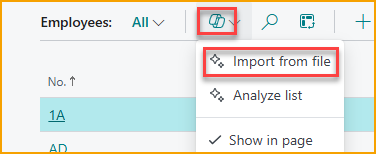
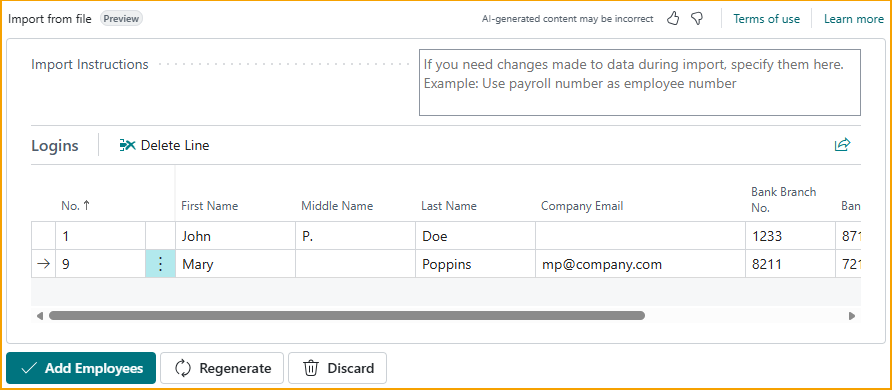
For example, a CSV file like this:
Employee No;Name;Email;Bank reg. No;Bank Account
1;John P. Doe;jd.company.com;1233;87119212
9;Mary Poppins;mp@company.com;8211;721231
will result in suggested employees as shown.
-
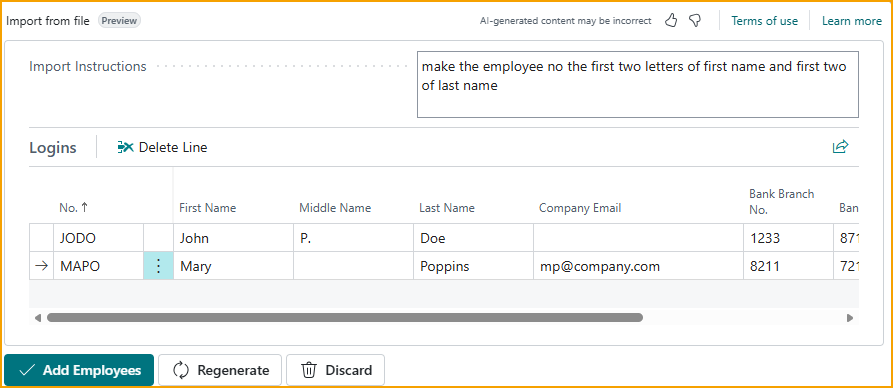
Review the suggested records. If the mapping is incorrect, enter a prompt and select Regenerate. For example:
make the employee no the first two letters of first name and first two of last name
-
Select Add Employees to create the records
After importing
Created employees are not yet connected to TEM. Continue with Connect to TEM to assign profiles, portal logins, and approvers.