Overview
AppsForDynamics365 Cloud Configuration is a shared Business Central extension - named Portal Connect in Extension Management - that establishes and maintains the connection between Business Central and the AppsForDynamics365 (A4D) cloud. It manages portal user accounts, handles data synchronization, and provides the authentication layer that all A4D applications depend on.
Cloud Configuration is installed automatically when you install Expense Management - you do not install it separately. What you do need to do manually is run the connection wizard to activate each Business Central environment and each company that should use the cloud service.
Cloud Configuration itself has no end-user features - it is a platform for administrators.
What Cloud Configuration does
| Capability | Description |
|---|---|
| Cloud connection | Authenticates your Business Central environment with the A4D cloud and keeps the connection active |
| Portal user management | Stores the login accounts that employees use to access the A4D portal and mobile apps |
| Data synchronization | Keeps user accounts, company registrations, and feature settings in sync between Business Central and the cloud |
| Notifications | Routes notification emails from A4D applications to employees |
Admin pages in Business Central
All Cloud Configuration administration is done from four pages, accessible via the Business Central search bar:
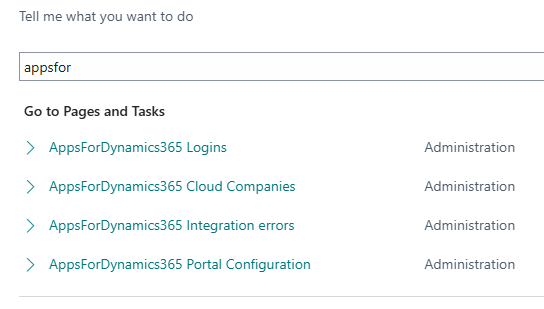
| Page | Purpose |
|---|---|
| AppsForDynamics365 Portal Configuration | Connection settings, authentication method, and status |
| AppsForDynamics365 Logins | Create and manage portal user accounts |
| AppsForDynamics365 Cloud Companies | View connected companies and remove stale registrations |
| AppsForDynamics365 Integration errors | Review sync errors for troubleshooting |
Where to start
- Check Prerequisites - you need a license key, customer ID, and Global Admin access.
- Run the Setup wizard - once to connect the Business Central environment, then once per company that should use the cloud service.
- Create portal logins for each employee who will use an A4D application.
Related
- Concepts: Architecture
- Concepts: Portal users