Setting up a French legal entity to operate under the FR mandate
Electronic invoicing in France is built around a decentralized CTC model where domestic B2B invoices must be exchanged and messages called "lifecycle status" must be sent between the buyer and the seller in response to some business events. This implies that a French company will be sending and received electronic communications through the life of each invoice from posting and, eventually, being paid. The sending and receiveing of the communication will be done using ExFlow e-Invoicing with Pagero integration and will require setting up 3 main areas:
- Microsoft D365 Finance data regarding the legal entity, its customers and its vendors to assure the transactions are posted according to the rules set by French accounting and French e-invoicing mandate.
- ExFlow Document Integration and ExFlow AP module to assure data posted in D365 Finance is gathered and send/receive from business partners via Pagero.
- Pagero system to assure that e-invoices can be correctly routed and archived.
The French reform also includes e-reporting obligations and these obligations will be fulfilled using standard D365 Finance functionality provided by Microsoft, hence the legal company must be correctly setup as per point 1 above.
Below is a high-level overview of how it works with ExFlow E-Invoicing and Pagero integration.
Legal and technical prerequisites
-
Validate the D365 Finance application version and build used by the customer. Microsoft France e-invoicing and e-reporting capabilities are delivered through recent D365 Finance releases and the required setup depends on the version and feature availability.
-
Do not mix the Microsoft standard France connector setup with the ExFlow/Pagero setup unless this has been explicitly agreed in this documentation. Microsoft standard documentation may describe Microsoft-provided French e-invoicing features and a standard PA connector, while this page describes the ExFlow Document Integration process with Pagero.
-
Assure your Pagero account is enabled for France and contains the required PA onboarding, company identifiers, technical connection data and routing setup.
-
Assure your ExFlow Document integration is updated to 1.4.0 and make sure the upgrade script has been run using the following instructions
Upgrade script
-
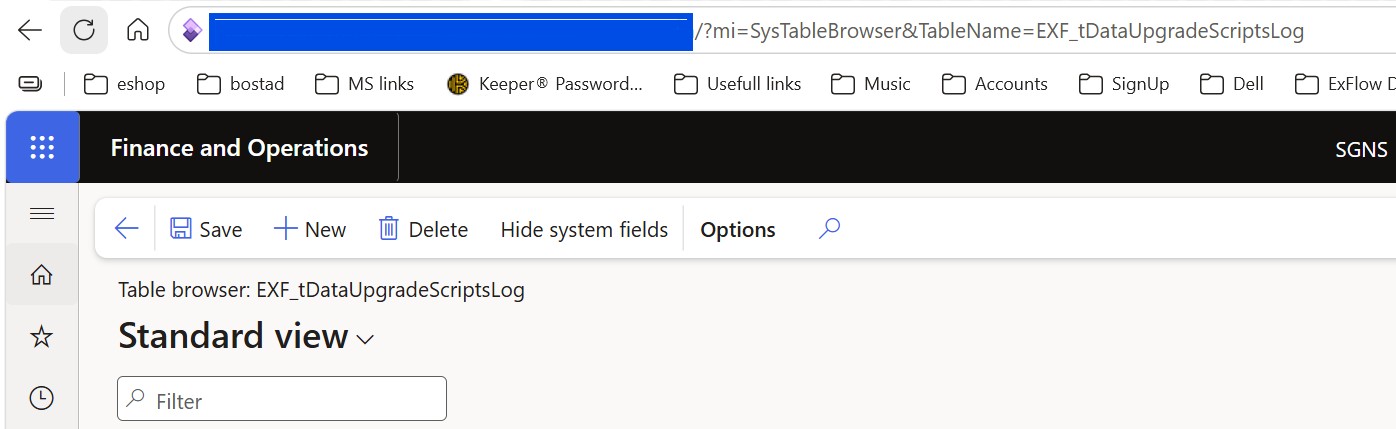
Open table browser for table “EXF_tDataUpgradeScriptsLog” by adding “?mi=SysTableBrowser&TableName=EXF_tDataUpgradeScriptsLog” to your D365 FO URL:
-
Make sure these records are added to the table:

-
If the records do not exist, ExFlow document integration upgrade script needs to be run in your environment.
-
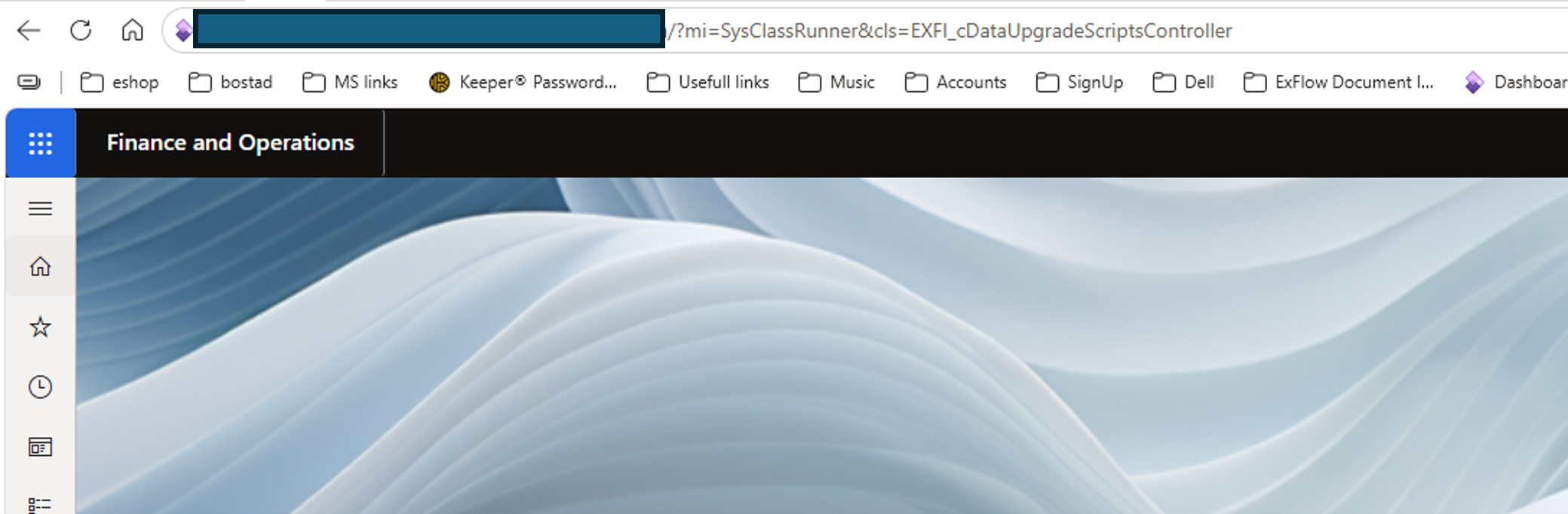
To run ExFlow document integration upgrade script manually in an environment, please follow the following steps: Add “?mi=SysClassRunner&cls=EXFI_cDataUpgradeScriptsController” to your application URL: “Your D365 FO application URL”/ ?mi=SysClassRunner&cls=EXFI_cDataUpgradeScriptsController&cmp="Your Legal Entity"
-
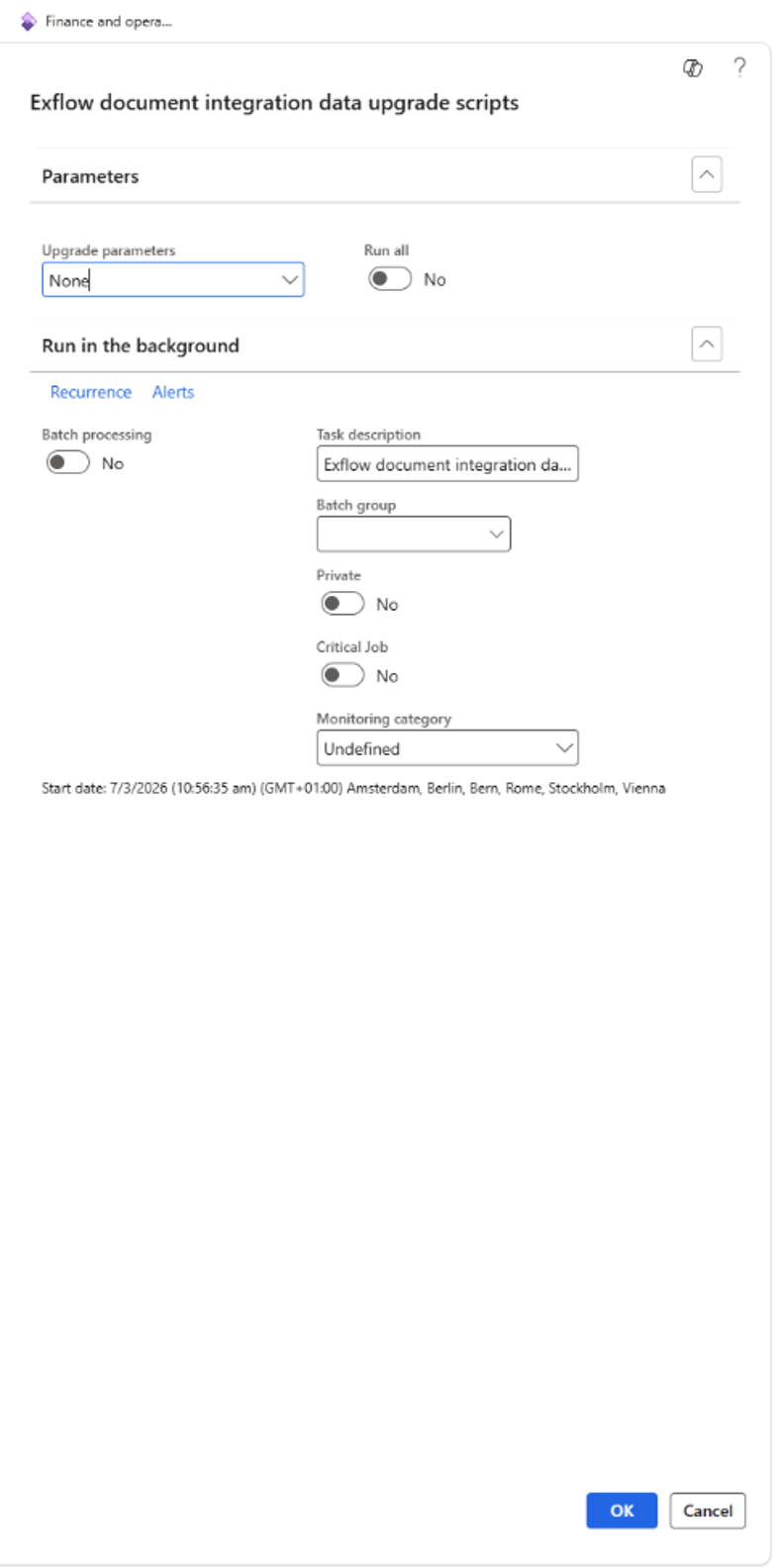
A dialog will be shown with parameters to choose how to run the script:
-
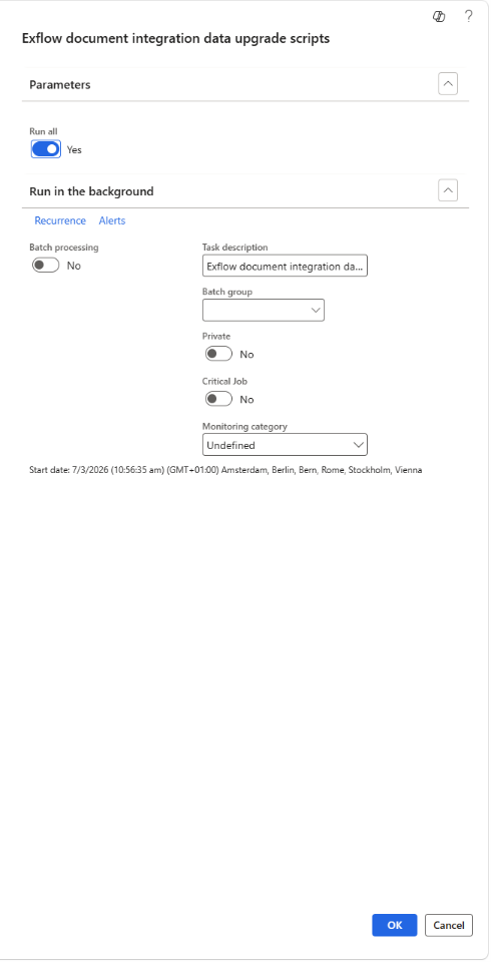
Choose “Run all” to run all the upgrade scripts and click “OK”:
-
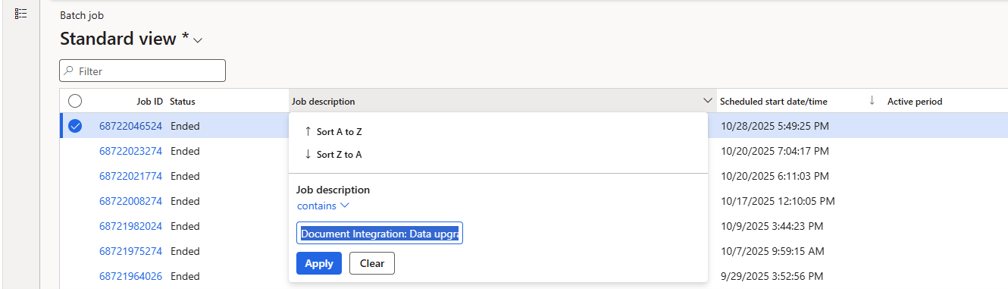
A scheduled batch jobs will be added to queue. Go to System administrator => Inquiries => Batch jobs and look and filter the job description on “Document Integration: Data upgrade scripts”
-
Make sure that you have these 3 batch jobs ran in your environemt:
- Document Integration: Data upgrade scripts (insertEXF_tCustTableFromCustTable)
- Document Integration: Data upgrade scripts (insertEXF_tVendTableFromVendTable)
- Document Integration: Data upgrade scripts (UpdateExFlowArchiveParameterForFrance)
-
Check the batch jobs Infolog to see that the jobs are run successfully.
-
Open table browser for table “EXF_tDataUpgradeScriptsLog” by adding “?mi=SysTableBrowser&TableName=EXF_tDataUpgradeScriptsLog” to your D365 FO URL:
-
Make sure these records are added to the table:

Microsoft setup
-
The invoice XML generation is done using Microsoft D365 Finance Electronic Reporting technology. Therefore, Electronic Reporting must be enabled and the required ER configurations must be imported from Dataverse and tested before sending invoices to Pagero.
-
Follow the steps described in Microsoft D365 Finance documentation to assure the invoice xml is generated according to FR mandate. Test that your specific business invoice processes are supported by Microsoft ER Configuration.
Clarify internal tax and routing data
Ensure you know for the French legal entity as describe here: https://learn.microsoft.com/en-us/dynamics365/finance/localizations/france/emea-fra-einv-ereport?context=/dynamics365/context/finance#set-up-registration-numbers https://learn.microsoft.com/en-us/dynamics365/finance/localizations/france/emea-fra-einv-ereport?context=/dynamics365/context/finance#configure-legal-entity-data
Add necessary Electronic document property types and data for the legal entity as described in Microsoft documentation.
-
French VAT number.
-
SIREN number.
-
SIRET number for each establishment used in invoicing or reporting.
-
Electronic invoicing address used to receive invoices.
-
Electronic address used to receive lifecycle statuses for issued invoices, if different.
-
PA assignment and validity period in the French Directory.
-
VAT regime and whether VAT is payable on debits or on payment receipt, since this impacts payment reporting and the Payment received status.
For customers and vendors:
https://learn.microsoft.com/en-us/dynamics365/finance/localizations/france/emea-fra-einv-ereport?context=/dynamics365/context/finance#configure-customer-data
Add necessary Electronic document property types and data for the customers as described in Microsoft documentation.
-
Country/region and VAT registration status.
-
SIREN, SIRET and routing code where applicable.
-
Electronic invoicing address registered in the French Directory for domestic B2B customers and vendors.
-
VAT number or foreign registration identifier for cross-border counterparties.
-
Classification of the transaction as domestic B2B e-invoicing, B2G, cross-border B2B, B2C or payment reporting.
Configure mandatory notes
Sales order and Free text invoices:
https://learn.microsoft.com/en-us/dynamics365/finance/localizations/france/emea-fra-einv-ereport?context=/dynamics365/context/finance#configure-mandatory-notes
ExFlow setup
-
Make sure ExFlow Document Integration is fully set up for Pagero integration as described in the Pagero Service page: ExFlow document integration / Setup / Shared parameters ExFlow document integration / Setup / Parameters ExFlow document integration / Setup / Export setup
-
Make sure the legal entity is configured for CTC and French mandate flows where required:
- ExFlow document integration / Setup / Parameters / General, set CTC Flow = Yes.
- ExFlow document integration / Setup / Lifecycle status
Lifecycle status
France requires lifecycle status handling for invoice transmission and business processing.
The minimum mandatory scope includes:
-
Submitted / Filed: the invoice has been received and validated by the PA.
-
Rejected: the invoice has failed technical, format, validation or routing checks.
-
Refused: the buyer refuses the invoice for business reasons.
-
Payment received: the supplier confirms that payment has been received where the status or payment reporting is required.
Additional statuses may be used depending on the customer scope, such as Made available, Received, Approved, Partially approved, Disputed, Suspended, Completed and Payment transmitted. ExFlow Document Integration exposes acknowledgements, errors and lifecycle history so the user can monitor the document and take corrective action where required.
Open ExFlow document integration | Setup | Lifecycle status
In the Overview tab:
| Field | Description |
|---|---|
| Code | Contains the lifecycle status code as determined by the French AFNOR: (mandatory) 200, 210, 212, 213 (optional) 204, 205, 206,207,208, 209, 211 |
| Description | Contains the standard text for the status code as defined by AFNOR |
| PA status | Contains the code used by Pagero for that status. Combination of PA status and Description is used to provide user information |
| Automated | Sets if the status will be sent automatically by a batch job |
| ER Configuration | Sets the Electronic reporting configuration that will be used to generate the xml message |
In order to assure correct transmission and reception of the lifecycle status, use the below values:
| Code | Description | PA status |
|---|---|---|
| 200 | Déposée | SUBMITTED |
| 201 | Émise par la plateforme | ISSUED_BY_PLATFORM |
| 202 | Reçue de la plateforme | RECEIVED_BY_PLATFORM |
| 203 | Mise à disposition | MADE_AVAILABLE |
| 204 | Prise en charge | IP |
| 205 | Approuvée | AP |
| 206 | Approuvée partiellement | PARTIALLY_ACCEPTED |
| 207 | En litige | UQ |
| 208 | Suspendue | ON_HOLD |
| 209 | Complétée | INFORMATION_PROVIDED |
| 210 | Refusée | RE |
| 211 | Paiement Transmis | PAYMENT_INITIATED |
| 212 | Encaissée | PAYMENT_RECEIVED |
| 213 | Rejetée | VF |
| 214 | Visée | ENDORSED |
| 220 | Annulée | SUPERSEDED |
| 224 | Demande de Paiement Direct | REQUEST_PAYMENT |
| 225 | Affacturée | FACTORED |
| 226 | Affacturée Confidentiel | FACTORED_CONFIDENTIAL |
| 227 | Changement de Compte à payer | ACCOUNT_CHANGED |
| 228 | Non Affacturée | FACTORING_CANCELLED |
Some of the codes require a predefined list of motives as stated by AFNOR (XP_Z12-012 Annexe A). The code motives can be entered by selecting the code and then "Motives" in the menu. Alternatively, Excel can be used to populate or edit this page. While the list of motives should be retrieved from AFNOR, for convenience, you can find here a summary. Check with AFNOR for any chanes or updates:
| Code motive | Motive Text | Description | REFUSÉE B2B | EN LITIGE | APPROUVÉE PARTIELLEMENT | SUSPENDUE | DÉPOSÉE |
|---|---|---|---|---|---|---|---|
| NON_TRANSMISE | Destinataire non connecté | Ce motif est utilisé UNIQUEMENT avec le statut ""DÉPOSÉE"" pour signifier que la facture n'a pas pu être transmise parce que le destinataire (ACHETEUR), bien que présent dans l'Annuaire PPF, n'a aucune adresse de réception de facture active (c’est-à-dire connectée à une Plateforme Agréée en réception). | X | ||||
| JUSTIF_ABS | Justificatif absent ou insuffisant | Ce motif doit être utilisé s'il manque des pièces jointes pour le traitement de la facture (statut ""Suspendue""). Elle devra faire l'objet d'un renvoi par l'émetteur d'un cycle de vie au statut ""Complétée"" avec la ou les pièce(s) jointe(s) manquante(s) | X | ||||
| AUTRE | Autre | Ce motif nécessite une explication en Note de CDV | X | X | |||
| COORD_BANC_ERR | Erreur de coordonnées bancaires | Les références bancaires sur la facture ne correspondent pas à ce qui est paramétré chez le Payeur / Acheteur) | X | X | |||
| TX_TVA_ERR | Taux de TVA erroné | Un taux de TVA utilisé n'est pas celui qui aurait dû | X | X | |||
| MONTANTTOTAL_ERR | Montant Total Erroné | Un des montants totaux de la facture est erronée, par exemple Net à payer | X | X | |||
| CALCUL_ERR | Erreur de calcul de la facture | Soit détecté au schematron, soit après (pour les lignes, ou arrondi non accepté) | X | X | |||
| NON_CONFORME | Mention légale manquante | Toute mention légale non contrôlée | X | X | |||
| DOUBLON | Facture en doublon (déjà émise / réçue) | Facture en doublon (même numéro même fournisseur et même année de la date de facture) | X | X | |||
| DEST_INC | Destinataire inconnu | A l'émission, le destinataire est inconnu. Il n'existe pas dans l'annuaire. | |||||
| DEST_ERR | Erreur de destinataire | L'entité juridique destinataire de la facture n'est pas la bonne (n° de SIREN du Destinataire). Par exemple en cas de multi-société dans un groupe, il arrive que la société facturée ne soit pas celle qui aurait dû l'être. | X | X | |||
| TRANSAC_INC | Transaction inconnue | La facture ne correspond pas à une livraison effectuée ou une prestation de service livrée. | X | X | |||
| EMMET_INC | Emetteur inconnu | L'émetteur de la facture est inconnu du Destinataire (anti-spam) | X | X | |||
| CONTRAT_TERM | Contrat terminé | Contrat terminé, plus de facture possible | X | X | |||
| DOUBLE_FACT | DOUBLE FACTURE | Prestation ou livraison déjà facturé sur une autre facture | X | X | |||
| CMD_ERR | N° de COMMANDE Incorrect ou manquant | N° de commande erroné, inexistant ou déjà facturé. Ne peut être utilisé avec un stratut REFUSÉE que si le numéro de camaande a été fourni par l'ACHETEUR AVANT LA FACTURATION. | X | X | X | X | |
| ADR_ERR | L'adresse de facturation électronique erronée | L'adresse de facturation électronique du destinataire (BT-49 ou BT-34) est absente ou erronée | X | X | |||
| SIRET_ERR | SIRET Erroné ou absent | Le SIRET du destinataire est erroné ou absent si exigé | X | X | X | ||
| CODE_ROUTAGE_ERR | CODE_ROUTAGE Absent ou Erroné | Le CODE_ROUTAGE du destinataire est erroné ou absent si exigé | X | X | X | ||
| REF_CT_ABSENT | Référence contractuelle nécessaire pour le traitement de la facture manquante | Référence exigée contractuellement est absente (liste à encadrer) et à identifier dans le CDV : BT-12 (N° de contrat), N° de BL (BT-16), Ref Acheteur (BT-10), Objet Facturé (BT-18), Référence Projet (BT-11), Facture antérieure (BG-3), … | X | X | X | X | |
| REF_ERR | Référence incorrecte | A préciser dans les autres données du CDV de quelle référence il s'agit | X | X | X | ||
| PU_ERR | Prix Unitaires incorrects | Un prix Unitaire n'est pas celui attendu | X | X | |||
| REM_ERR | Remise erronée | Une remise est absente ou n'est pas celle attendue | X | X | |||
| QTE_ERR | Quantité facturée incorrecte | Une quantité facturée n'est pas celle attendue | X | X | |||
| ART_ERR | Article facturé incorrect | Un article facturé n'est pas le bon ou est erroné | X | X | |||
| MODPAI_ERR | Modalités de paiement incorrectes | Les modalités de paiement (date d'échéance par exemple) n'est pas celle escomptées | X | X | |||
| QUALITE_ERR | Qualité d'article livré incorrecte | Un des articles livré est défectueux | X | X | |||
| LIVR_INCOMP | Problème de livraison | Livraison incomplète, non conforme | X | X | |||
| REJ_SEMAN | Rejet pour erreur sémantique | Analyse du format sémantique | |||||
| REJ_UNI | Rejet sur contrôle unicité | Contrôle d'unicité | |||||
| REJ_COH | Rejet sur contrôle Cohérence de données | Contrôle cohérence de données (les balises et les référentiels) | |||||
| REJ_ADR | Rejet sur Contrôle d'adressage | Contrôle d'adressage | |||||
| REJ_CONT_B2G | Rejet sur Contrôles métier B2G | Contrôles B2G (vérification du n° d'engagement…) | |||||
| REJ_REF_PJ | Rejet sur Référence de PJ | Référence de PJ | |||||
| REJ_ASS_PJ | Rejet sur Erreur d'association de la PJ | Erreur d'association de la PJ |
Truvio ExFlow AP automation
Due to standard French practices and the e-invoicing mandate, the vendor sender of an invoice may identify itself in the invoice by using the SIREN or SIRET number. Male sure you setup the Vendor identifiers rules considering these 2 identifiers. https://docs.signupsoftware.com/finance-operations/docs/user-manual/import-methods/vendor-identifier-rules#vendor-identifier-rules
Additionaly, make sure the archive functionality is enabled in:
ExFlow AP | Setup | Parameters | General Archive = Yes.
Common D365 Finance localization & master data
Import the Microsoft provided configurations from Dataverse for the xml invoice generation and the Truvio provided ER configurations for the lifecycle status xml generation and verify they are confirmed as compatible with the project scope and the Pagero integration.
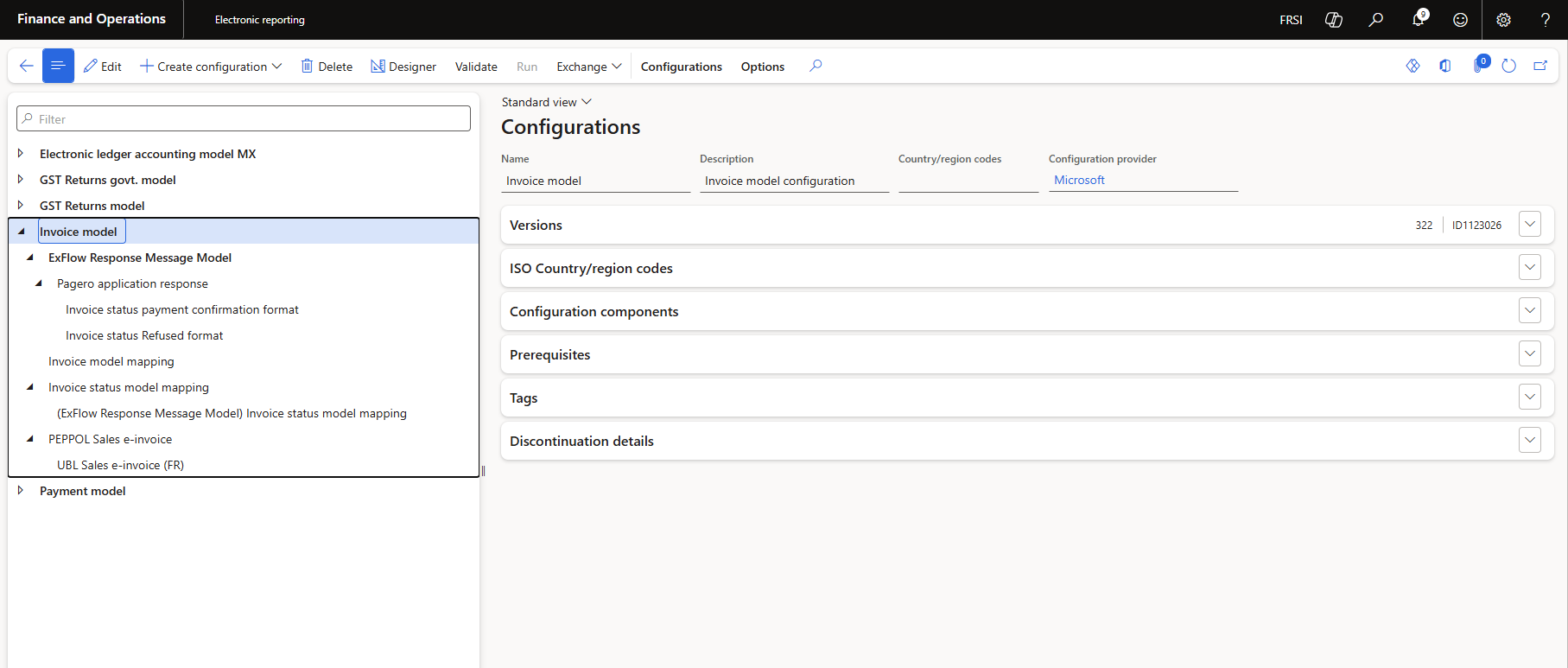
Go to Organization administration / Electronic reporting / Configurations and assure that all required parent ER configurations are available.
Validation, error handling and resubmission
If Pagero or PPF validation fails, the document or report is not considered successfully processed.
The user must:
-
Review the error in ExFlow Document Integration.
-
Use Communication log and Error information to identify the root cause.
-
Correct the data in D365 Finance or in the relevant ExFlow setup.
-
Regenerate the ER output where required.
-
Resubmit the document or report from ExFlow Document Integration.
Typical correction areas include missing SIREN/SIRET, invalid routing address, incorrect VAT setup, missing tax exemption reason, invalid XML content or unsupported document classification.